此页面记录的 Bun.fileBun.write API 经过高度优化,代表了使用 Bun 执行文件系统任务的推荐方式。对于尚未通过 Bun.file 提供的操作,如 mkdirreaddir,可以使用 Bun 对 node:fs 模块的几乎完整 实现。

读取文件 (Bun.file())

Bun.file(path): BunFile 使用函数 Bun.file(path) 创建一个 BunFile 实例。BunFile 代表一个惰性加载的文件;初始化时并不会真正从磁盘读取文件。
const foo = Bun.file("foo.txt"); // 相对于当前工作目录
foo.size; // 字节数
foo.type; // MIME 类型
该引用遵循 Blob 接口,因此内容可以以多种格式读取。
const foo = Bun.file("foo.txt");

await foo.text(); // 作为字符串的内容
await foo.json(); // 作为 JSON 对象的内容
await foo.stream(); // 作为 ReadableStream 的内容
await foo.arrayBuffer(); // 作为 ArrayBuffer 的内容
await foo.bytes(); // 作为 Uint8Array 的内容
文件引用也可以通过数字 文件描述符file:// URL 创建。
Bun.file(1234);
Bun.file(new URL(import.meta.url)); // 当前文件的引用
BunFile 可以指向磁盘上不存在文件的位置。
const notreal = Bun.file("notreal.txt");
notreal.size; // 0
notreal.type; // "text/plain;charset=utf-8"
const exists = await notreal.exists(); // false
默认 MIME 类型是 text/plain;charset=utf-8,但可以通过向 Bun.file 传递第二个参数覆盖它。
const notreal = Bun.file("notreal.json", { type: "application/json" });
notreal.type; // => "application/json;charset=utf-8"
为了方便,Bun 将 stdinstdoutstderr 作为 BunFile 实例暴露。
Bun.stdin; // 只读
Bun.stdout;
Bun.stderr;

删除文件 (file.delete())

可以通过调用 .delete() 函数删除文件。
await Bun.file("logs.json").delete();

写入文件 (Bun.write())

Bun.write(destination, data): Promise<number> Bun.write 是一个多功能工具,用于将各种类型的负载写入磁盘。 第一个参数是目标 destination,可以是以下任意类型:
  • string:文件系统上的路径。使用 "path" 模块进行路径操作。
  • URLfile:// 描述符。
  • BunFile:文件引用。
第二个参数是要写入的数据。类型可以是:
  • string
  • Blob(包括 BunFile
  • ArrayBufferSharedArrayBuffer
  • TypedArray(如 Uint8Array 等)
  • Response
所有可能的组合都使用当前平台上最快的系统调用处理。
输出输入系统调用平台
文件文件copy_file_rangeLinux
文件管道sendfileLinux
管道管道spliceLinux
终端文件sendfileLinux
终端终端sendfileLinux
套接字文件或管道sendfile(如果是 http,非 https)Linux
文件(不存在)文件(路径)clonefilemacOS
文件(已存在)文件fcopyfilemacOS
文件Blob 或字符串writemacOS
文件Blob 或字符串writeLinux
将字符串写入磁盘:
const data = `那是最好的时代,那是最坏的时代。`;
await Bun.write("output.txt", data);
将文件复制到磁盘上另一个位置:
const input = Bun.file("input.txt");
const output = Bun.file("output.txt"); // 还不存在!
await Bun.write(output, input);
将字节数组写入磁盘:
const encoder = new TextEncoder();
const data = encoder.encode("datadatadata"); // Uint8Array
await Bun.write("output.txt", data);
将文件内容写入 stdout
const input = Bun.file("input.txt");
await Bun.write(Bun.stdout, input);
将 HTTP 响应的正文写入磁盘:
const response = await fetch("https://bun.com");
await Bun.write("index.html", response);

使用 FileSink 进行增量写入

Bun 提供了一个原生的增量写入文件 API,叫做 FileSink。从 BunFile 获取 FileSink 实例:
const file = Bun.file("output.txt");
const writer = file.writer();
增量写入文件时,调用 .write()
const file = Bun.file("output.txt");
const writer = file.writer();

writer.write("那是最好的时代\n");
writer.write("那是最坏的时代\n");
这些数据块将在内部缓存。要将缓存写入磁盘,使用 .flush()。此方法返回已写入字节数。
writer.flush(); // 将缓存写入磁盘
FileSink高水位线(内部缓存满)达到时,缓存也会自动刷新。可通过配置此参数来调整。
const file = Bun.file("output.txt");
const writer = file.writer({ highWaterMark: 1024 * 1024 }); // 1MB
刷新缓存并关闭文件:
writer.end();
注意,默认情况下,bun 进程会保持运行,直到显式调用 .end() 关闭此 FileSink。如果要取消此行为,可以调用该实例的 unref
writer.unref();

// 之后可再次调用以恢复保持进程存活
writer.ref();

目录操作

Bun 对 node:fs 的实现很快,目前尚未为读取目录实现 Bun 专用 API。当前应使用 node:fs 在 Bun 中处理目录。

读取目录(readdir)

在 Bun 中,使用 node:fs 模块的 readdir 读取目录。
import { readdir } from "node:fs/promises";

// 读取当前目录下所有文件
const files = await readdir(import.meta.dir);

递归读取目录

使用 readdir 并开启 recursive: true 递归读取目录。
import { readdir } from "node:fs/promises";

// 递归读取上级目录中所有文件
const files = await readdir("../", { recursive: true });

创建目录(mkdir)

递归创建目录需使用 node:fsmkdir
import { mkdir } from "node:fs/promises";

await mkdir("path/to/dir", { recursive: true });

性能基准

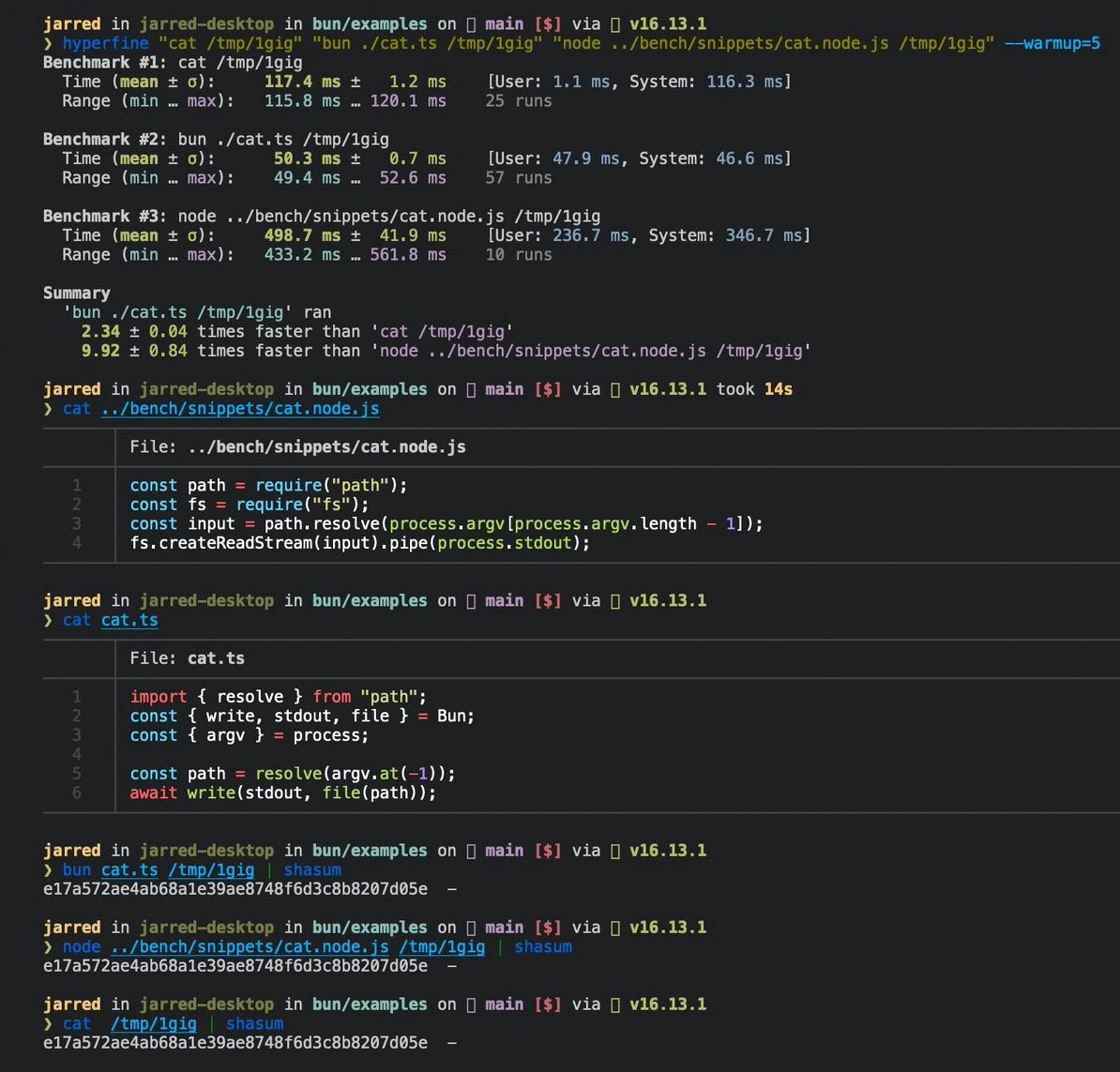
以下是 Linux 下 cat 命令的三行实现。
https://mintcdn.com/ikxin/RzFFGbzo0-4huILA/icons/typescript.svg?fit=max&auto=format&n=RzFFGbzo0-4huILA&q=85&s=a3dffd2241f05776d3bd25171d0c5a79cat.ts
// 用法
// bun ./cat.ts ./path-to-file

import { resolve } from "path";

const path = resolve(process.argv.at(-1));
await Bun.write(Bun.stdout, Bun.file(path));
运行该文件:
terminal
bun ./cat.ts ./path-to-file
在 Linux 上处理大文件时,速度是 GNU cat 的 2 倍。
Cat 截图

参考

interface Bun {
  stdin: BunFile;
  stdout: BunFile;
  stderr: BunFile;

  file(path: string | number | URL, options?: { type?: string }): BunFile;

  write(
    destination: string | number | BunFile | URL,
    input: string | Blob | ArrayBuffer | SharedArrayBuffer | TypedArray | Response,
  ): Promise<number>;
}

interface BunFile {
  readonly size: number;
  readonly type: string;

  text(): Promise<string>;
  stream(): ReadableStream;
  arrayBuffer(): Promise<ArrayBuffer>;
  json(): Promise<any>;
  writer(params: { highWaterMark?: number }): FileSink;
  exists(): Promise<boolean>;
}

export interface FileSink {
  write(chunk: string | ArrayBufferView | ArrayBuffer | SharedArrayBuffer): number;
  flush(): number | Promise<number>;
  end(error?: Error): number | Promise<number>;
  start(options?: { highWaterMark?: number }): void;
  ref(): void;
  unref(): void;
}