

bun build CLI 命令或 Bun.build() JavaScript API 使用 Bun 的原生打包器。
一览
- JS API:
await Bun.build({ entrypoints, outdir }) - CLI:
bun build <入口文件> --outdir ./out - 监视:
--watch实现增量重建 - 目标环境:
--target browser|bun|node - 格式:
--format esm|cjs|iife(cjs/iife 为实验性功能)
- JavaScript
- CLI
build.ts

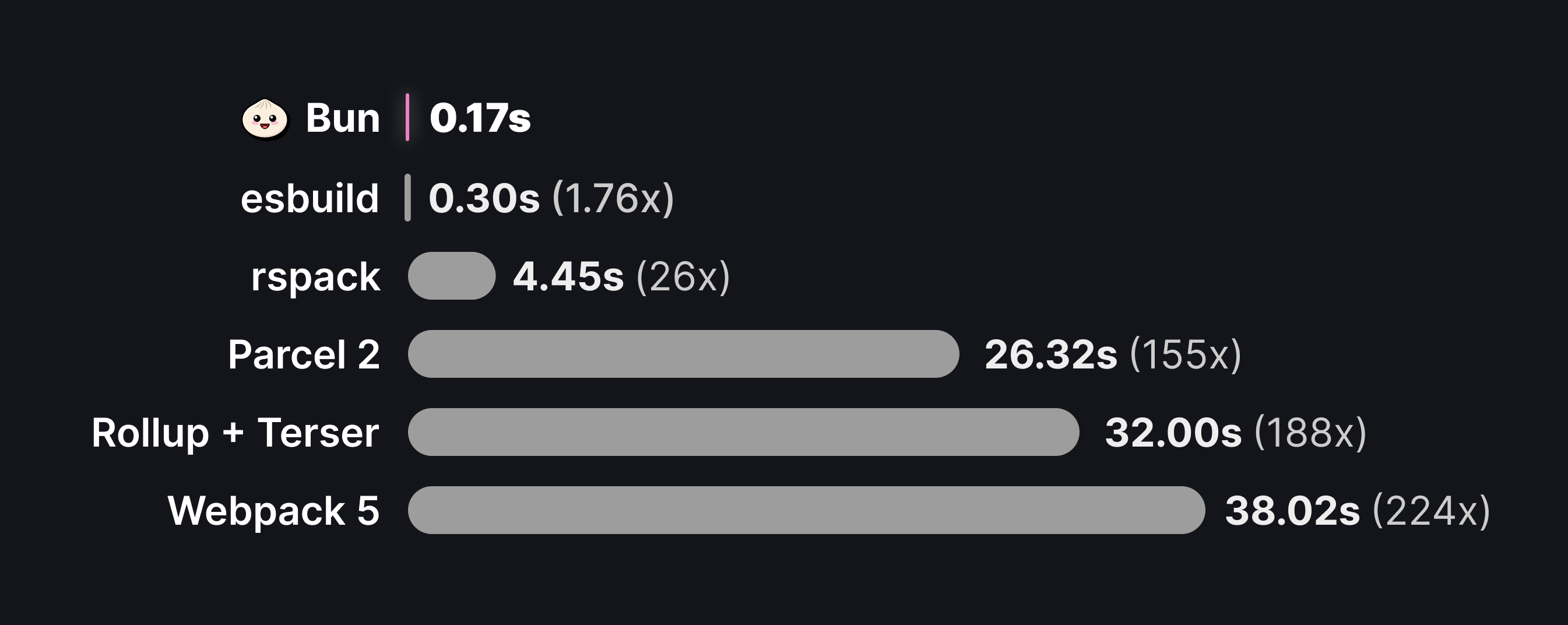
为什么要打包?
打包器可以解决以下几个问题:- Reducing HTTP requests. A single package in
node_modulesmay consist of hundreds of files, and large applications may have dozens of such dependencies. Loading each of these files with a separate HTTP request becomes untenable, so bundlers convert your application source code into a smaller number of self-contained “bundles” that can be loaded with a single request. - Code transforms. Modern apps are commonly built with languages or tools like TypeScript, JSX, and CSS modules. All of these must be converted into plain JavaScript and CSS before a browser can consume them. The bundler is the natural place to configure these transformations.
- Framework features. Frameworks rely on bundler plugins & code transformations to implement common patterns like file-system routing, client-server code co-location (think
getServerSidePropsor Remix loaders), and server components. - Full-stack Applications. Bun’s bundler can handle both server and client code in a single command, enabling optimized production builds and single-file executables. With build-time HTML imports, you can bundle your entire application — frontend assets and backend server — into a single deployable unit.
Bun 打包器不用于替代
tsc 进行类型检查或生成类型声明。基本示例
构建你的第一个 bundle。你有以下两个文件,它们实现了一个客户端渲染的 React 应用。index.tsx 是应用的“入口点”:也就是打包器开始处理的文件。通常,这是一个会执行某些副作用的脚本,例如启动服务器,或者在本例中初始化一个 React 根节点。由于这些文件使用了 TypeScript 和 JSX,因此必须先进行打包,然后才能发送到浏览器。
要创建 bundle:
entrypoints 中指定的每个文件,Bun 都会生成一个新的 bundle,并将其写入 ./out 目录(该路径相对于当前工作目录解析)。运行构建命令后,文件系统如下所示:
文件系统
out/index.js 的内容大致如下:
out/index.js

监听模式
和运行时与测试器一样,打包器原生支持监听模式。terminal
支持的内容类型
与 Bun 运行时一样,打包器默认支持多种文件类型。下表列出了打包器的标准“加载器”。参见 加载器。资源文件
If the bundler encounters an import with an unrecognized extension, it treats the imported file as an external file. The bundler copies the referenced file as-is intooutdir and resolves the import as a path to the file.
naming 和 publicPath。
有关文件加载器的更多信息,请参见加载器。
插件
插件可以覆盖或扩展本表中所述的行为。参见加载器。API
入口点
必填 一个与应用程序入口点对应的路径数组。Bun 会为每个入口点生成一个捆绑包。- JavaScript
- CLI
build.ts
文件
用于内存打包的文件路径到文件内容的映射:打包磁盘上不存在的虚拟文件,或覆盖磁盘上已有文件的内容。此选项仅适用于 JavaScript API。 You can provide file contents as astring, Blob, TypedArray, or ArrayBuffer.
完全内存打包
只需在files 中提供所有源文件,即可在磁盘上没有任何文件的情况下打包代码:
build.ts
files map, Bun uses the current working directory as the root.
覆盖磁盘文件
内存文件的优先级高于磁盘上的文件,因此你可以在保持代码库其余部分不变的同时覆盖特定文件:build.ts
混合磁盘与虚拟文件
磁盘文件可导入虚拟文件,虚拟文件也可导入磁盘文件:build.ts
outdir
写入输出文件的目录。- JavaScript
- CLI
build.ts
outdir to the JavaScript API, Bun does not write bundled code to disk. It returns the bundled files in an array of BuildArtifact objects. These objects are Blobs with extra properties; see Outputs.
build.ts
outdir 后,BuildArtifact 上的 path 属性就是写入文件的绝对路径。
target
指定目标执行环境。- JavaScript
- CLI
build.ts
browser
默认值。 用于在浏览器中运行的捆绑包。解析导入时,优先使用
"browser" 导出条件。
导入 node:events 或 node:path 等内置模块可以正常工作,但调用某些函数(例如 fs.readFile)则无法正常工作。bun
用于在 Bun 运行时中运行的捆绑包。在许多情况下,无需捆绑服务器端代码;你可以直接执行源代码而无需修改。不过,捆绑服务器代码可以缩短启动时间并提高运行性能。对于在构建时导入 HTML、并将服务器端和客户端代码捆绑在一起的全栈应用,应使用此目标。所有使用
target: "bun" 生成的捆绑包都会标记 // @bun 编译指令,告知 Bun 运行时无需在执行前重新转译文件。如果任何入口点包含 Bun shebang(#!/usr/bin/env bun),捆绑器会默认使用 target: "bun",而不是 "browser"。When you use target: "bun" and format: "cjs" together, the bundler adds the // @bun @bun-cjs pragma, and the CommonJS wrapper function is not compatible with Node.js.node
用于在 Node.js 中运行的捆绑包。解析导入时,优先使用
"node" 导出条件。Bun 不会为 Bun 全局对象或内置的 bun:* 模块提供 polyfill。format
指定生成 bundle 的模块格式。 Bun 默认为"esm",并提供 "cjs" 和 "iife" 实验性支持。
格式: “esm” - ES 模块
默认格式。支持 ES 模块语法,包括顶层 await 和import.meta。
- JavaScript
- CLI
build.ts
format 设置为 "esm",并使用 <script type="module"> 标签加载 bundle。
格式: “cjs” - CommonJS
To build a CommonJS module, setformat to "cjs". When you choose "cjs", the default target changes from "browser" (esm) to "node" (cjs). CommonJS modules transpiled with format: "cjs", target: "node" run in both Bun and Node.js (assuming both support the APIs in use).
- JavaScript
- CLI
build.ts
格式: “iife” - IIFE
To build an IIFE bundle, setformat to "iife". Bun wraps the bundle in an immediately invoked function expression and does not support exposing its exports under a global name.
jsx
配置 JSX 的编译方式。
Classic 运行时示例(使用 factory 和 fragment):
importSource):
splitting
是否启用代码拆分。- JavaScript
- CLI
build.ts
true 时,打包器会启用代码拆分。当多个入口点导入同一个文件或模块时,打包器可以将这部分共享代码拆分到一个单独的包中,这个包称为 chunk。请考虑以下文件:
- JavaScript
- CLI
build.ts
文件系统
chunk-dqmx6gc8.js file contains the shared code. To avoid collisions, the file name includes a content hash by default. The bun build CLI names this chunk entry-a-t268ez5g.js instead of chunk-<hash>.js. Customize this with naming.
Each import() of a bundled JavaScript module also becomes its own chunk. Tree shaking applies to these chunks too: if every import() of a module lives in code that tree shaking removes — for example inside a function that is only called behind a define or features gate that evaluates to false — and nothing else in the live output imports the module, its chunk is not written and the module is absent from the metafile’s inputs and outputs. Setting treeShaking: false keeps every import() chunk. This differs from esbuild, which emits a chunk for every reachable import() target.
With target: "bun", a require() of a bundled ES module becomes a chunk of its own as well. The call is emitted as import.meta.require("./chunk-<hash>.js") and stays synchronous — Bun evaluates the chunk when the call runs — so a require() inside a function that never runs keeps its module out of the startup working set entirely. Tree shaking treats these chunks like import() chunks. require() of a CommonJS module is unaffected and keeps returning module.exports. A require() cycle between such chunks follows Bun’s runtime require() of an ES module: a module required again while its chunk is still being loaded sees the partially initialized CommonJS placeholder ({}) rather than the live bindings the in-chunk wrapper provides. For other targets — and with splitRequire: false (--no-split-require) — the required module is inlined into the calling chunk behind a lazy wrapper instead, because the call must return synchronously.
Tree-shaking import() and require() results
When the result of a string-literal import() or require() of an ES module is only ever used to read specific exports, the exports nobody reads are dropped from that module — and whatever only they depended on tree-shakes with them. This applies with and without splitting; the module is still loaded lazily, exactly where the call is written.
entry.ts
const { a, b: c, ...rest } = await import(x), also let/var and export const { a } = …), property access on the awaited value or on a local holding it ((await import(x)).a, const ns = await import(x); ns.a; const { b } = ns), .then(({ a }) => …) / .then(ns => ns.a) with an arrow function, per-element destructuring of await Promise.all([import(x), import(y)]), the same shapes for require(), and a bare import(x); / await import(x); / require(x); statement (nothing observed).
The module keeps every export as soon as one use can’t be followed: the namespace is passed, returned, stored, spread or iterated (() => import(x), fn(ns), { ...ns }, Object.keys(ns)), accessed with a computed key (or ?. directly on the await import(x) expression), handed to a non-arrow .then callback, reached via import * as ns elsewhere, or read under a direct eval. CommonJS targets always keep everything. The imported module itself is always evaluated; only with "sideEffects": false can a module it merely re-exports from be skipped when none of those re-exports are observed.
- JavaScript
- CLI
build.ts
minChunkSize
Withsplitting, also fold small side-effect-free chunks into a chunk that more entrypoints load.
- JavaScript
- CLI
build.ts
index.tsx imports and that a lazily import()ed module also imports lives in the chunk of index.tsx, and the lazy chunk imports it from there, because the lazy module can only load after index.tsx has run. That fold never makes an entrypoint load more code, so it is always on.
Nothing folds into the chunk of an entrypoint whose name has no [hash] (the default naming). Whatever loads that file can add a query string to its URL (index.js?v=123), and an import "./index.js" in another chunk would then run the file a second time. The shared code goes into one hashed chunk next to the entrypoint. Entrypoints that an HTML file loads, and entrypoints with [hash] in naming.entry, still take the fold.
minChunkSize goes further for chunks whose source files add up to fewer than this many bytes and whose modules run nothing at the top level: only declarations, "sideEffects": false in their package.json, a lazily initialized CommonJS/ESM wrapper, or an import of a CommonJS module (such as react) that is already initialized wherever the chunk’s code ends up. Such a chunk folds into a chunk loaded by a superset of its importers. Everything it imports must already be loaded whenever that target is, or be side-effect free as well. The extra entrypoints then carry some unused definitions, capped at about 1.5% of what each entrypoint loaded to begin with. No side effect runs earlier than before and nothing lazy becomes eager. Because these rules bound what an entrypoint can end up loading, a large minChunkSize is reasonable.
For target: "browser", where every chunk is a request, 16 KiB is a good starting point.
A chunk that absorbs other chunks exports the symbols those chunks’ importers need. An entrypoint that has exports of its own never absorbs one, so its module namespace stays as written; an entrypoint without exports can. With --compile, nothing folds into the entrypoint’s own chunk.
modulePreload
Withsplitting and target: "browser", the browser would otherwise discover a chunk’s own imports only after downloading and parsing it, one level per round trip. Bun writes a <link rel="modulepreload"> into HTML entrypoints for every chunk the page’s script statically imports, and every import() first inserts one for each chunk its target statically imports (transitively), so the whole dependency chain downloads in parallel. Outside a document (workers, server-side) the import() helper does nothing. Inserted links copy the nonce from a <meta property="csp-nonce" nonce="..."> tag if the page has one. Enabled by default; set modulePreload: false (--no-module-preload) to emit plain import() calls and no links.
插件
打包时应用的插件列表。build.ts
env
Controls how environment variables are handled during bundling. Internally, this option usesdefine to inject environment variables into the bundle; env is a shorthand for specifying which ones.
env: “inline”
将process.env.FOO 替换为包含环境变量实际值的字符串字面量,内联进 bundle。
- JavaScript
- CLI
build.ts
input.js
output.js
env: “PUBLIC_*“(前缀)
内联匹配给定前缀的环境变量(即* 字符之前的部分),将 process.env.FOO 替换为实际的环境变量值。使用前缀可以内联公共值(例如面向公众的 URL 或客户端令牌),而不会将私有凭据注入输出 bundle。
- JavaScript
- CLI
build.ts
terminal
index.tsx
output.js
env: “disable”
完全禁用环境变量注入。sourcemap
指定生成哪种类型的 sourcemap。- JavaScript
- CLI
build.ts
关联的
*.js.map sourcemap 是一个包含等效 debugId 属性的 JSON 文件。
压缩
是否启用代码压缩,默认false。
启用所有压缩选项:
- JavaScript
- CLI
build.ts
- JavaScript
- CLI
build.ts
外部依赖
外部依赖列表,默认空数组[]。
- JavaScript
- CLI
build.ts
index.tsx
index.tsx 会生成一个包含整个 “zod” 包源代码的构建产物。若要保持导入语句原样,则将其标记为外部依赖:
- JavaScript
- CLI
build.ts
out/index.js
* 标记所有导入为外部:
- JavaScript
- CLI
build.ts
包
控制是否将包依赖项包含在构建包中。可能的值:bundle(默认)、external。Bun 将导入路径不以 ., .. 或 / 开头的任何导入视为包。
- JavaScript
- 命令行
build.ts
命名
Customizes the generated file names. Defaults to[dir]/[name].[ext].
- JavaScript
- CLI
build.ts
file system
file system
naming field customizes the names and locations of the generated files. It accepts a template string. Bun uses the template for all bundles that correspond to entrypoints and replaces the following tokens with their values:
[name]- The name of the entrypoint file, without the extension.[ext]- The extension of the generated bundle.[hash]- A hash of the bundle contents: 8 lowercase alphanumeric characters. If two outputs with different contents would print the same characters, both get enough extra characters to differ (as do the outputs that reference them).[hash9]through[hash13]set a wider minimum;[hash13]is the full 64-bit hash.[dir]- The relative path from the project root to the parent directory of the source file.
组合这些标记以创建模板字符串。例如,要在生成的捆绑文件名中包含哈希值:
- JavaScript
- CLI
build.ts
file system
naming field, Bun uses it only for bundles that correspond to entrypoints. The names of chunks and copied assets are not affected. In the JavaScript API, you can specify a separate template string for each type of generated file.
- JavaScript
- CLI
build.ts
根目录
项目根目录。- JavaScript
- CLI
build.ts
文件系统
pages 目录中构建两个入口文件:
- JavaScript
- CLI
文件系统
pages directory is the first common ancestor of the entrypoint files, so Bun treats it as the project root. As a result, the generated bundles live at the top level of the out directory; there is no out/pages directory.
通过指定 root 选项可以覆盖此行为:
- JavaScript
- CLI
root 为 . 时,生成的文件结构如下:
publicPath
添加到打包代码中所有导入路径前的前缀。 在许多情况下,生成的 bundle 不包含任何导入语句;打包的目标就是将所有代码合并到单个文件中。不过在少数情况下,生成的 bundle 会包含导入语句:- Asset imports — When importing an unrecognized file type like
*.svg, the bundler defers to the file loader, which copies the file intooutdiras is. The import is converted into a variable. - External modules — Files and modules marked as external are not included in the bundle. Instead, the bundler leaves the import statement in the final bundle.
- Chunking. When
splittingis enabled, the bundler may generate separate “chunk” files that represent code that is shared among multiple entrypoints.
publicPath 会使用指定的值作为所有文件路径的前缀。
- JavaScript
- CLI
build.ts
out/index.js
定义
A map of global identifiers to be replaced at build time. Keys of this object are identifiers or dotted property paths such asprocess.env.NODE_ENV, and values are JSON strings, identifiers, or property paths that are inlined.
- JavaScript
- CLI
build.ts
加载器
将文件扩展名映射到内置加载器名称的表。使用它自定义某些文件的加载方式。- JavaScript
- CLI
build.ts
横幅
添加到最终 bundle 中的横幅内容。它可以是 React 使用的"use client" 指令,也可以是许可证等注释块。
- JavaScript
- CLI
build.ts
页脚
添加到最终构建包的页脚。可以是许可证的注释块,也可以是一个有趣的彩蛋。- JavaScript
- CLI
build.ts
drop
Removes function calls from a bundle. For example,--drop=console removes all calls to console.log. Bun also removes the arguments to dropped calls, even if they have side effects. Dropping debugger removes all debugger statements.
- JavaScript
- CLI
build.ts
功能
Enable compile-time feature flags for dead code elimination: conditionally include or exclude code paths at bundle time usingimport { feature } from "bun:bundle".
app.ts
- JavaScript
- CLI
build.ts
feature() function with true or false at bundle time. When minification is also enabled, Bun eliminates the unreachable code:
输入
输出(启用 --feature PREMIUM --minify)
输出(不启用 --feature PREMIUM,启用 --minify)
feature()requires a string literal argument — dynamic values are not supported- Bun completely removes the
bun:bundleimport from the output - Works with
bun build,bun run, andbun test - You can enable multiple flags:
--feature FLAG_A --feature FLAG_B - For type safety, augment the
Registryinterface to restrictfeature()to known flags
- 平台差异代码(
feature("SERVER")vsfeature("CLIENT")) - 环境变量控制功能(
feature("DEVELOPMENT")) - 渐进式功能发布
- A/B 测试
- 付费版功能区分
feature() 可传任意字符串。想实现自动提示防错,可新建 env.d.ts 文件(或补充到已有 .d.ts)并声明扩展:
env.d.ts
tsconfig.json 中(例如 "include": ["src", "env.d.ts"])。现在,feature() 只接受这些标记,像 feature("TYPO") 这样的无效字符串会产生类型错误。
optimizeImports
Skip parsing unused submodules of barrel files (re-export index files). When you import only a few named exports from a large library, normally the bundler parses every file the barrel re-exports. WithoptimizeImports, the bundler parses only the submodules you use.
build.ts
import { Button } from 'antd' normally parses all ~3000 modules that antd/index.js re-exports. With optimizeImports: ['antd'], the bundler parses only the Button submodule.
This works for pure barrel files — files where every named export is a re-export (export { X } from './x'). If a barrel file has any local exports (export const foo = ...), or if any importer uses import *, the bundler loads all submodules.
The bundler always loads export * re-exports (it never defers them) to avoid circular resolution issues. It defers only named re-exports (export { X } from './x') that no importer uses.
自动模式: 在 package.json 中带有 "sideEffects": false 的包会自动启用桶优化——无需配置 optimizeImports。对于没有该字段的包,可以使用 optimizeImports。
插件: Resolve 和 load 插件可与桶优化配合使用。延迟加载的子模块最终加载时,会经过插件管道。
Re-exported namespaces
Property reads on an import that turns out to be a module namespace are linked straight to the export they name, the same as a named import. This covers namespaces reached indirectly: Each of these shapes oflib.ts qualifies:
object, the exports object for ./external is not created unless something else uses the namespace as a value (Object.keys(z), { ...z }, passing z around), and the exports you don’t touch are tree-shaken. One level is resolved (ns.a.b binds a). Calling a function this way passes undefined as this, as with import * as ns; ns.fn().
Assignments (z.x = 1), optional chains, and non-literal computed keys (z[key]) are left as property accesses; z["object"] is treated like z.object. export default someImport is followed only when it ends at a namespace; a default that snapshots a let export keeps snapshot semantics.
The same applies to the default import of a CommonJS module whose exports.x = ... assignments the bundler lifted to ES module exports, such as react and scheduler. The default import of a CommonJS module is its module.exports, which is that module’s namespace, so import React from "react"; React.useState() compiles to a direct call of the lifted useState binding. This holds while every use of React reads, calls or assigns one of its properties: React.useState, React[key], const { useState } = React. A write, React.useLayoutEffect = React.useEffect, goes through a namespace object whose setters assign the lifted binding, so every importer sees the new value, the same as a write to module.exports. Code that holds React itself as a value (fn(React), Object.keys(React), const R = React, a re-export) or deletes one of its properties can change the object in ways a namespace object cannot pass on to the lifted bindings (Object.defineProperty, delete, Object.freeze). The module then keeps its CommonJS wrapper and the default import is the real module.exports object. This rule looks at import React from only. ns.default on import * as ns, the default of an import() and the this of a call like React.fn() are still the namespace object of a module that stays lifted. React.default, and ns.default on import * as ns, is the lifted default export when the module has one, and otherwise the namespace itself, as module.exports is in Node. A module that sets both exports.__esModule and exports.default keeps its CommonJS wrapper when the importer is not an ES module by type (.mjs, .mts, or "type": "module"), because the default import then depends on that flag at run time. An import() of a module that does not set both resolves to that same namespace object as default, with or without code splitting.
deprecatedNamespaceObjectSetters
Defaulttrue. When a namespace object does have to be created, each property currently gets a getter and a setter; the setter accepts ns.foo = value without throwing (reads still return the module’s binding). Set this to false to emit getter-only namespace objects, which is what a future Bun release will do unconditionally. The namespace of a lifted CommonJS module is not affected: it stands in for module.exports, so its setters assign the lifted bindings either way.
- JavaScript
- CLI
build.ts
metafile
生成结构化格式的构建元数据。元数据文件描述每个输入和输出文件,包括大小、导入和导出。可用于:- Bundle 分析:了解哪些内容影响 Bundle 大小
- 可视化:提供给 esbuild 的 Bundle 分析器 等工具
- 依赖跟踪:查看应用程序的完整导入图
- CI 集成:跟踪 Bundle 大小随时间的变化
- JavaScript
- CLI
build.ts
Markdown 元数据文件
使用--metafile-md 生成一个 Markdown 元数据文件,它对 LLM 友好,并且在终端中可读:
terminal
--metafile and --metafile-md together:
terminal
metafile 选项格式
在 JavaScript API 中,metafile 支持以下几种形式:
build.ts
输出
Bun.build 返回一个 Promise<BuildOutput>,定义如下:
build.ts
outputs 数组包含构建生成的所有文件。每个 artifact 都实现了 Blob 接口。
build.ts
BuildArtifact 对象可以直接传给 new Response()。
build.ts
BuildArtifact objects to help with debugging.
字节码
bytecode: boolean 选项会为任何 JavaScript/TypeScript 入口点生成字节码,这可以显著提升大型应用的启动速度。需要 "target": "bun" 以及匹配版本的 Bun。
- CommonJS: Works with or without
compile: true. Generates a.jscfile alongside each entrypoint. - ESM: Requires
compile: true. Bun embeds the bytecode and module metadata in the standalone executable.
format,字节码默认为 CommonJS。
The bytecodeDepth: number option (a non-negative integer) limits how many levels of nested functions are compiled ahead of time (0 = only each module’s top-level code). Functions past the limit are compiled from source when first called. Defaults to all.
- JavaScript
- CLI
build.ts
可执行文件
Bun 支持将 JavaScript/TypeScript 入口“编译”为独立可执行文件,其中包含 Bun 二进制文件。terminal
日志和错误
失败时,Bun.build 会返回一个被拒绝的、包含 AggregateError 的 Promise。将其记录到控制台可以美化打印错误列表,也可以通过 try/catch 代码块以编程方式读取。
build.ts
Bun.build 调用前使用顶层 await。
错误列表中每条均为 BuildMessage 或 ResolveMessage 实例(继承自 Error),含详细信息:
build.ts
logs 字段,包含打包警告和信息。
build.ts
参考
TypeScript 定义
CLI 用法
通用配置
boolean
设置
NODE_ENV=production 并启用压缩boolean
编译时使用字节码缓存
number
预先编译为字节码的嵌套函数层数(非负整数)。默认编译所有层级
boolean
使用
—bytecode 时:跳过构建时的字节码优化过程string
default:"browser"
打包的预期执行环境。可选
browser、bun 或 nodestring
传递自定义解析条件
string
default:"disable"
将环境变量内联到包中,形式为
process.env.$。要内联匹配某个前缀的变量,可以使用类似
FOO_PUBLIC_* 的通配符输出与文件处理
string
default:"dist"
输出目录(用于构建多个入口点时)
string
输出到指定文件
string
写入包含构建元数据的 JSON 文件
string
写入以可视化模块图的 Markdown 文件(便于 LLM 使用)
string
default:"none"
生成源码映射。可选
linked、inline、external 或 nonestring
在输出文件前添加标头(例如 React 服务器组件的
“use client”)在输出文件尾部添加注释(例如
// built with bun!)string
default:"esm"
输出包的模块格式。可选
esm、cjs 或 iife。当使用 —bytecode
时,默认值为 cjs。文件命名
string
default:"[dir]/[name].[ext]"
自定义入口点的文件名格式
string
default:"[name]-[hash].[ext]"
自定义代码块文件名格式
string
default:"[name]-[hash].[ext]"
自定义资源文件名格式
打包选项
string
打包多个入口点时使用的根目录
boolean
启用共享模块的代码分割
number
使用
--splitting 时,也会将小于此源字节数且无副作用的代码块,合并到由其所有导入方都能加载的代码块中boolean
同时使用
--splitting 和 --target browser 时,不为入口点或 import() 所依赖的代码块生成 <link rel="modulepreload">string
打包器添加到打包代码中导入路径前的前缀
string
从包中排除模块(支持通配符)。别名:
-estring
default:"*"
允许未解析且符合这些 glob 模式的动态 import()/require() 标识符。传入
” 可允许不透明标识符boolean
如果任何动态 import()/require() 标识符无法在构建时解析,则构建失败
string
default:"bundle"
依赖处理方式:
external 或 bundleboolean
只进行转译,不打包
boolean
合并 CSS 文件以减少重复(仅当多个入口点引入 CSS 时生效)
压缩与优化
boolean
default:"true"
重新输出死代码消除注释。在使用
—minify-whitespace 时禁用boolean
输出仅包含 getter 的模块命名空间对象(赋值给属性会抛出错误,与真正的命名空间对象相同)。此选项将在未来版本中成为默认设置
boolean
启用所有压缩选项
boolean
压缩语法并内联常量
boolean
压缩空白字符
boolean
压缩变量和函数标识符
boolean
压缩时保留原始的函数和类名称
开发功能
boolean
文件变化时自动重建
boolean
使用
—watch 时不清屏boolean
启用 React 快速刷新转换(用于开发测试)
boolean
对
.jsx/.tsx 文件运行 React Compiler,自动对组件和钩子进行记忆化。打包器根据 --target 推导输出模式(browser → 客户端,bun/node → ssr)。实验性功能。独立可执行文件
boolean
生成一个包含该包的独立 Bun 可执行文件
string
向独立可执行文件的
execArgv 前置参数number
default:"1"
可执行文件启动时使用的 JIT 层级提升阈值倍率;
1 表示正常的 JIT 策略。请参阅 Bun.unsafe.setJITPolicyboolean
default:"true"
在独立可执行文件中启用
.env 文件的自动加载boolean
在独立可执行文件中禁用
.env 文件的自动加载boolean
default:"true"
在独立可执行文件中启用
bunfig.toml 的自动加载boolean
在独立可执行文件中禁用
bunfig.toml 的自动加载boolean
default:"false"
在独立可执行文件运行时启用
tsconfig.json 的自动加载boolean
在独立可执行文件运行时禁用
tsconfig.json 的自动加载boolean
default:"false"
在独立可执行文件运行时启用
package.json 的自动加载boolean
在独立可执行文件运行时禁用
package.json 的自动加载string
指定用于交叉编译的 Bun 可执行文件路径,以替代下载
string
将文件或目录嵌入编译后的可执行文件,并以其基本名称作为路径;目录会保留其内部树结构,因此
—asset ./static/public 会嵌入 public/…(需要 —compile)Windows 可执行文件详情
boolean
运行编译后的 Windows 可执行文件时防止打开控制台窗口
string
设置 Windows 可执行文件图标
string
设置 Windows 可执行文件产品名称
string
设置 Windows 可执行文件公司名称
string
设置 Windows 可执行文件版本(例如
1.2.3.4)string
设置 Windows 可执行文件描述
string
设置 Windows 可执行文件版权声明
实验性功能及应用构建
boolean
(实验性) 使用 Bun Bake 构建生产环境的 Web 应用
boolean
(实验性) 启用 React 服务器组件
boolean
当设置了
—app 时,即使是静态构建也将所有服务器文件导出到磁盘boolean
当设置了
—app 时,禁用所有压缩