Bun 以速度为设计目标。关键路径经过广泛的性能分析和基准测试。所有 Bun 公共基准测试的源代码都可以在 Bun 仓库的 /bench 目录中找到。

测量时间

为了精确测量时间,Bun 提供了两个运行时 API 函数:
  1. Web 标准的 performance.now() 函数
  2. Bun.nanoseconds(),类似于 performance.now(),但它返回应用程序启动以来的当前时间,单位为纳秒。你可以使用 performance.timeOrigin 将其转换为 Unix 时间戳。

基准测试工具

编写自己的基准测试时,选择合适的工具非常重要。
  • 对于微基准测试,一个很好的通用工具是 mitata
  • 对于负载测试,你必须使用至少与 Bun.serve() 同样快速的 HTTP 基准测试工具,否则你的结果会受到影响。一些流行的基于 Node.js 的基准测试工具如 autocannon 速度不够。我们推荐以下工具之一:
  • 对于基准测试脚本或 CLI 命令,我们推荐 hyperfine

测量内存使用

Bun 有两个堆。一个堆用于 JavaScript 运行时,另一个堆用于其他所有内容。

JavaScript 堆统计

bun:jsc 模块暴露了一些用于测量内存使用的函数:
import { heapStats } from "bun:jsc";
console.log(heapStats());
https://mintcdn.com/ikxin/RzFFGbzo0-4huILA/icons/typescript.svg?fit=max&auto=format&n=RzFFGbzo0-4huILA&q=85&s=a3dffd2241f05776d3bd25171d0c5a79
{
  heapSize: 1657575,
  heapCapacity: 2872775,
  extraMemorySize: 598199,
  objectCount: 13790,
  protectedObjectCount: 62,
  globalObjectCount: 1,
  protectedGlobalObjectCount: 1,
  // 堆中每种对象类型的计数
  objectTypeCounts: {
    CallbackObject: 25,
    FunctionExecutable: 2078,
    AsyncGeneratorFunction: 2,
    'RegExp String Iterator': 1,
    FunctionCodeBlock: 188,
    ModuleProgramExecutable: 13,
    String: 1,
    UnlinkedModuleProgramCodeBlock: 13,
    JSON: 1,
    AsyncGenerator: 1,
    Symbol: 1,
    GetterSetter: 68,
    ImportMeta: 10,
    DOMAttributeGetterSetter: 1,
    UnlinkedFunctionCodeBlock: 174,
    RegExp: 52,
    ModuleLoader: 1,
    Intl: 1,
    WeakMap: 4,
    Generator: 2,
    PropertyTable: 95,
    'Array Iterator': 1,
    JSLexicalEnvironment: 75,
    UnlinkedFunctionExecutable: 2067,
    WeakSet: 1,
    console: 1,
    Map: 23,
    SparseArrayValueMap: 14,
    StructureChain: 19,
    Set: 18,
    'String Iterator': 1,
    FunctionRareData: 3,
    JSGlobalLexicalEnvironment: 1,
    Object: 481,
    BigInt: 2,
    StructureRareData: 55,
    Array: 179,
    AbortController: 2,
    ModuleNamespaceObject: 11,
    ShadowRealm: 1,
    'Immutable Butterfly': 103,
    Primordials: 1,
    'Set Iterator': 1,
    JSGlobalProxy: 1,
    AsyncFromSyncIterator: 1,
    ModuleRecord: 13,
    FinalizationRegistry: 1,
    AsyncIterator: 1,
    InternalPromise: 22,
    Iterator: 1,
    CustomGetterSetter: 65,
    Promise: 19,
    WeakRef: 1,
    InternalPromisePrototype: 1,
    Function: 2381,
    AsyncFunction: 2,
    GlobalObject: 1,
    ArrayBuffer: 2,
    Boolean: 1,
    Math: 1,
    CallbackConstructor: 1,
    Error: 2,
    JSModuleEnvironment: 13,
    WebAssembly: 1,
    HashMapBucket: 300,
    Callee: 3,
    symbol: 37,
    string: 2484,
    Performance: 1,
    ModuleProgramCodeBlock: 12,
    JSSourceCode: 13,
    JSPropertyNameEnumerator: 3,
    NativeExecutable: 290,
    Number: 1,
    Structure: 1550,
    SymbolTable: 108,
    GeneratorFunction: 2,
    'Map Iterator': 1
  },
  protectedObjectTypeCounts: {
    CallbackConstructor: 1,
    BigInt: 1,
    RegExp: 2,
    GlobalObject: 1,
    UnlinkedModuleProgramCodeBlock: 13,
    HashMapBucket: 2,
    Structure: 41,
    JSPropertyNameEnumerator: 1
  }
}
JavaScript 是一种垃圾回收语言,不是计数引用。对象在所有情况下不立即释放是正常且正确的,尽管对象永远不被释放是不正常的。 要强制手动运行垃圾回收:
Bun.gc(true); // 同步执行
Bun.gc(false); // 异步执行
堆快照让你能够检查哪些对象没有被释放。你可以使用 bun:jsc 模块生成堆快照,然后用 Safari 或 WebKit GTK 开发者工具查看。生成堆快照:
import { generateHeapSnapshot } from "bun";

const snapshot = generateHeapSnapshot();
await Bun.write("heap.json", JSON.stringify(snapshot, null, 2));
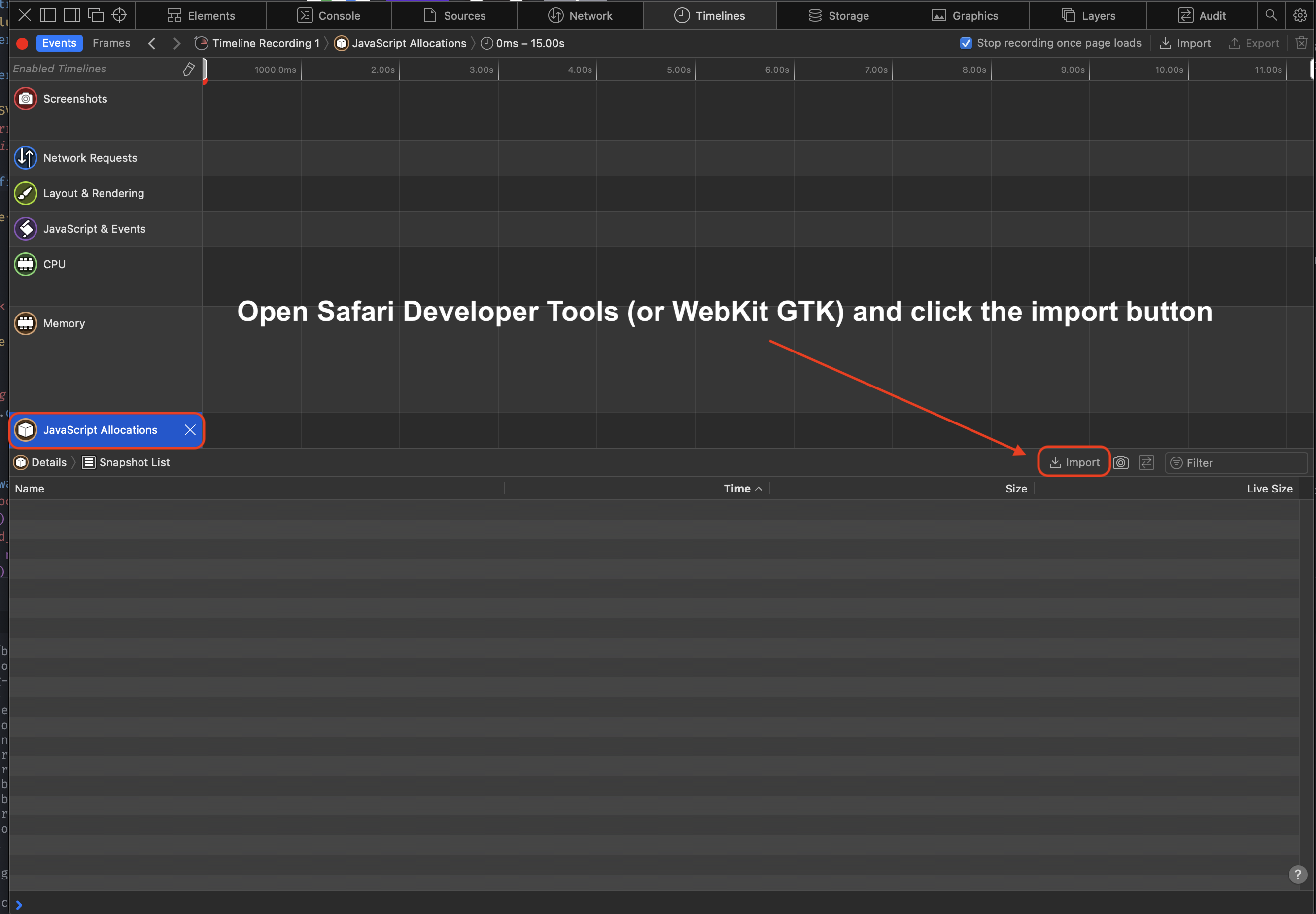
要查看快照,在 Safari 开发者工具(或 WebKit GTK)中打开 heap.json 文件:
  1. 打开开发者工具
  2. 点击「Timeline」(时间轴)
  3. 在左侧菜单点击「JavaScript Allocations」(JavaScript 分配)。可能需要点击铅笔图标才能显示所有时间轴
  4. 点击「Import」(导入),选择你的堆快照 JSON
导入堆快照
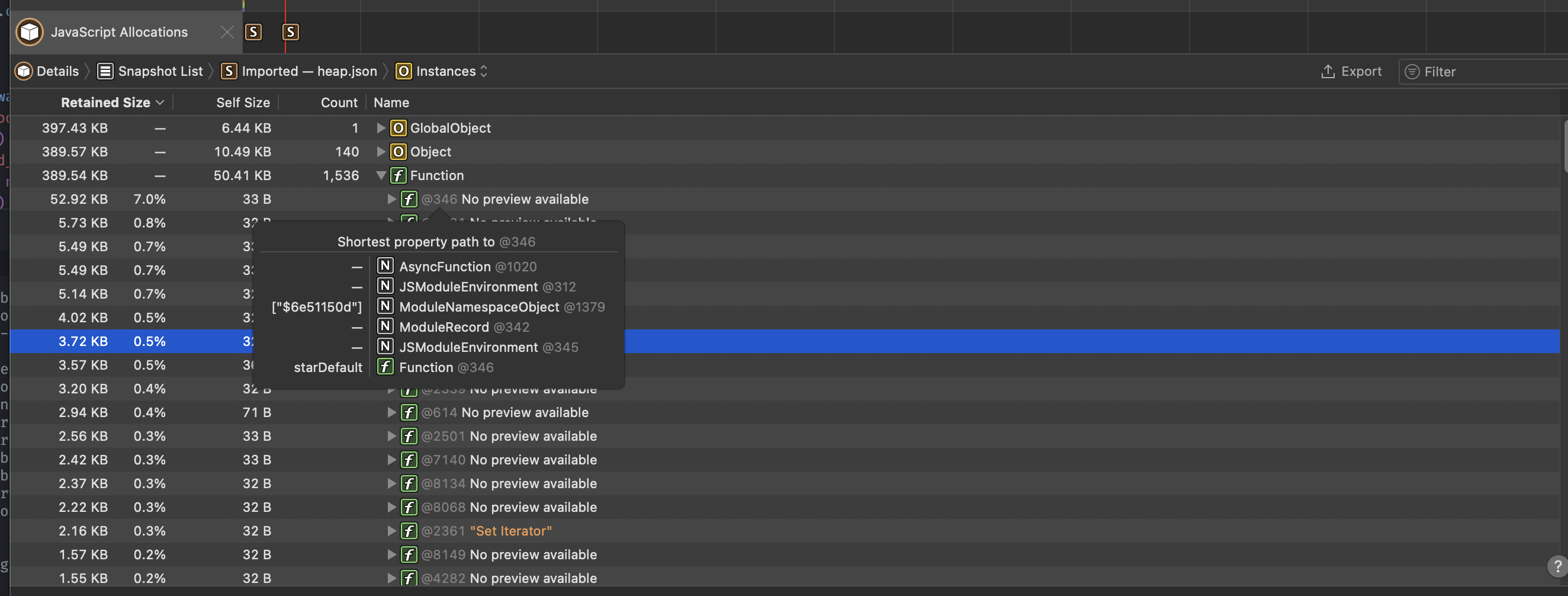
导入后,你应该看到类似以下界面:
在 Safari 中查看堆快照
网页调试器 也提供时间轴功能,允许你追踪并检查运行中的调试会话的内存使用情况。

本地堆统计

Bun 另外使用 mimalloc 管理其他堆。要报告非 JavaScript 内存使用的汇总信息,设置环境变量 MIMALLOC_SHOW_STATS=1,退出时会打印统计信息。
terminal
MIMALLOC_SHOW_STATS=1 bun script.js
heap stats:    peak      total      freed    current       unit      count
  reserved:   64.0 MiB   64.0 MiB      0       64.0 MiB                        not all freed!
 committed:   64.0 MiB   64.0 MiB      0       64.0 MiB                        not all freed!
     reset:      0          0          0          0                            ok
   touched:  128.5 KiB  128.5 KiB    5.4 MiB   -5.3 MiB                        ok
  segments:      1          1          0          1                            not all freed!
-abandoned:      0          0          0          0                            ok
   -cached:      0          0          0          0                            ok
     pages:      0          0         53        -53                            ok
-abandoned:      0          0          0          0                            ok
 -extended:      0
 -noretire:      0
     mmaps:      0
   commits:      0
   threads:      0          0          0          0                            ok
  searches:     0.0 avg
numa nodes:       1
   elapsed:       0.068 s
   process: user: 0.061 s, system: 0.014 s, faults: 0, rss: 57.4 MiB, commit: 64.0 MiB

CPU 性能分析

使用 --cpu-prof 标志分析 JavaScript 执行性能,以识别性能瓶颈。
terminal
bun --cpu-prof script.js
这会生成一个 .cpuprofile 文件,你可以在 Chrome DevTools(性能标签页 → 加载配置文件)或 VS Code 的 CPU 分析器中打开。

选项

terminal
bun --cpu-prof --cpu-prof-name my-profile.cpuprofile script.js
bun --cpu-prof --cpu-prof-dir ./profiles script.js
标志说明
--cpu-prof启用性能分析
--cpu-prof-name <filename>设置输出文件名
--cpu-prof-dir <dir>设置输出目录