> ## Documentation Index
> Fetch the complete documentation index at: https://bun.zhcndoc.com/llms.txt
> Use this file to discover all available pages before exploring further.
# SQLite
> Bun 内置了高性能的 SQLite3 驱动。
Bun 内置了高性能的 [SQLite3](https://www.sqlite.org/) 驱动。要使用它,请从内置的 `bun:sqlite` 模块导入。
```ts db.ts icon="https://mintcdn.com/bun-zhcndoc/cnUTwgMuf4cCrwC-/icons/typescript.svg?fit=max&auto=format&n=cnUTwgMuf4cCrwC-&q=85&s=e7767043c9e885c34f2d6c8fe2a95217" theme={"theme":{"light":"github-light","dark":"dracula"}}
import { Database } from "bun:sqlite";
const db = new Database(":memory:");
const query = db.query("select 'Hello world' as message;");
query.get();
```
```txt theme={"theme":{"light":"github-light","dark":"dracula"}}
{ message: "Hello world" }
```
API 是同步的,并且速度很快。感谢 [better-sqlite3](https://github.com/JoshuaWise/better-sqlite3) 及其贡献者对 `bun:sqlite` 的 API 提供了启发。
功能包括:
* 事务支持
* 参数绑定(命名和位置)
* 预处理语句
* 数据类型转换(`BLOB` 转为 `Uint8Array`)
* 无需 ORM,将查询结果映射为类实例 — `query.as(MyClass)`
* JavaScript 中最快的 SQLite 驱动性能
* 支持 `bigint`
* 支持多条查询语句(如 `SELECT 1; SELECT 2;`)通过一次调用 `database.run(query)`
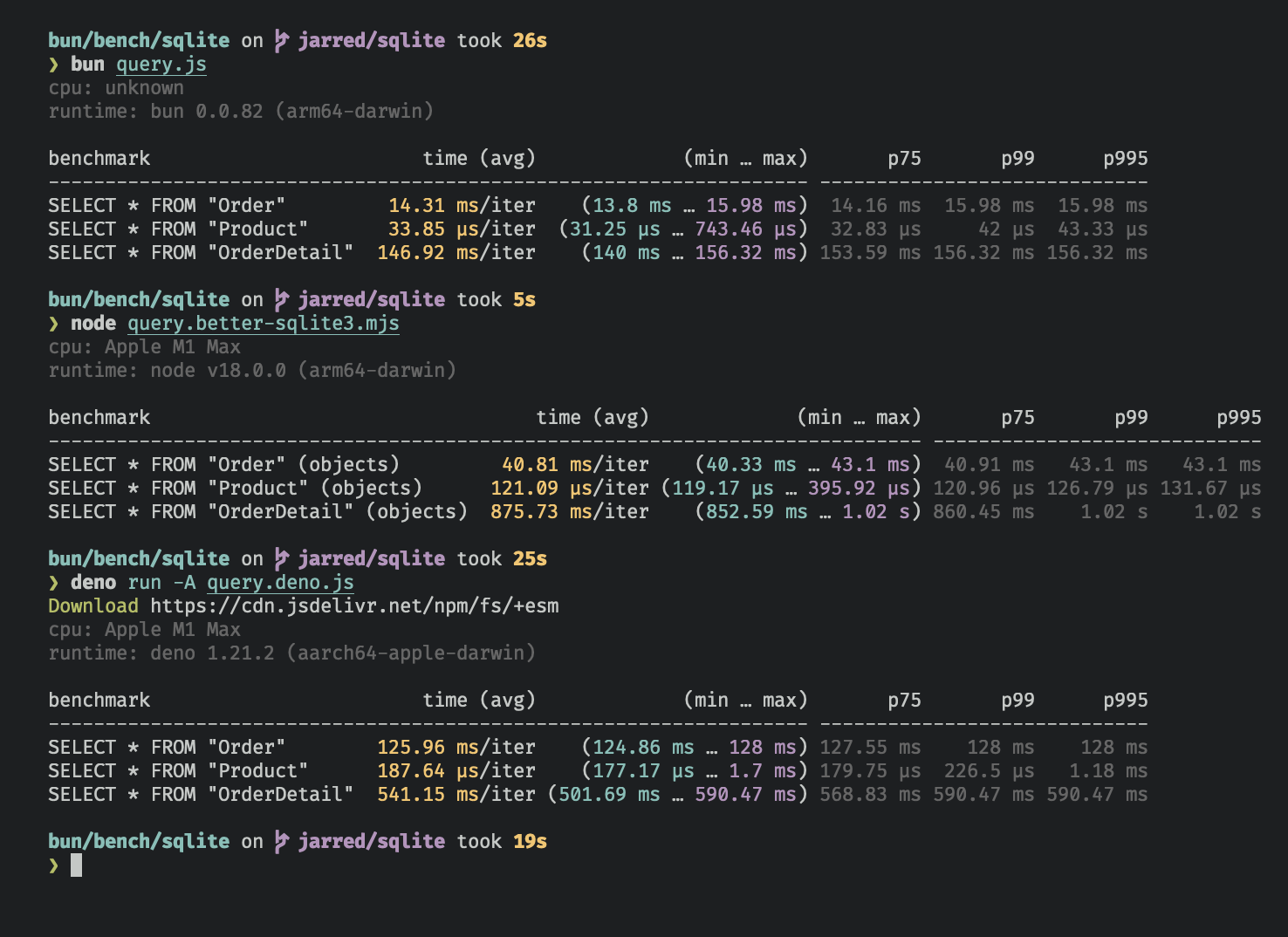
`bun:sqlite` 在读取查询上比 `better-sqlite3` 快约 3-6 倍,比 `deno.land/x/sqlite` 快约 8-9 倍。各驱动均基于 [Northwind Traders](https://github.com/jpwhite3/northwind-SQLite3/blob/46d5f8a64f396f87cd374d1600dbf521523980e8/Northwind_large.sqlite.zip) 数据集进行基准测试。查看并运行[基准测试源码](https://github.com/oven-sh/bun/tree/main/bench/sqlite)。
***
## 数据库
打开或创建 SQLite3 数据库:
```ts db.ts icon="https://mintcdn.com/bun-zhcndoc/cnUTwgMuf4cCrwC-/icons/typescript.svg?fit=max&auto=format&n=cnUTwgMuf4cCrwC-&q=85&s=e7767043c9e885c34f2d6c8fe2a95217" theme={"theme":{"light":"github-light","dark":"dracula"}}
import { Database } from "bun:sqlite";
const db = new Database("mydb.sqlite");
```
打开内存数据库:
```ts db.ts icon="https://mintcdn.com/bun-zhcndoc/cnUTwgMuf4cCrwC-/icons/typescript.svg?fit=max&auto=format&n=cnUTwgMuf4cCrwC-&q=85&s=e7767043c9e885c34f2d6c8fe2a95217" theme={"theme":{"light":"github-light","dark":"dracula"}}
import { Database } from "bun:sqlite";
const db = new Database(":memory:");
// 以下方式效果相同
const db = new Database();
const db = new Database("");
```
以只读模式打开:
```ts db.ts icon="https://mintcdn.com/bun-zhcndoc/cnUTwgMuf4cCrwC-/icons/typescript.svg?fit=max&auto=format&n=cnUTwgMuf4cCrwC-&q=85&s=e7767043c9e885c34f2d6c8fe2a95217" highlight={2} theme={"theme":{"light":"github-light","dark":"dracula"}}
import { Database } from "bun:sqlite";
const db = new Database("mydb.sqlite", { readonly: true });
```
如果文件不存在则创建数据库:
```ts db.ts icon="https://mintcdn.com/bun-zhcndoc/cnUTwgMuf4cCrwC-/icons/typescript.svg?fit=max&auto=format&n=cnUTwgMuf4cCrwC-&q=85&s=e7767043c9e885c34f2d6c8fe2a95217" highlight={2} theme={"theme":{"light":"github-light","dark":"dracula"}}
import { Database } from "bun:sqlite";
const db = new Database("mydb.sqlite", { create: true });
```
### 严格模式
默认情况下,`bun:sqlite` 绑定参数时需要包含 `$`、`:` 或 `@` 前缀,且如果缺少参数不会抛出错误。
如果希望缺少参数时抛出错误,并且允许绑定时不使用前缀,可以在 `Database` 构造函数中设置 `strict: true`:
```ts db.ts icon="https://mintcdn.com/bun-zhcndoc/cnUTwgMuf4cCrwC-/icons/typescript.svg?fit=max&auto=format&n=cnUTwgMuf4cCrwC-&q=85&s=e7767043c9e885c34f2d6c8fe2a95217" highlight={3} theme={"theme":{"light":"github-light","dark":"dracula"}}
import { Database } from "bun:sqlite";
const strict = new Database(":memory:", { strict: true });
// 因拼写错误会抛出错误:
const query = strict.query("SELECT $message;").all({ messag: "Hello world" });
const notStrict = new Database(":memory:");
// 不会抛出错误:
notStrict.query("SELECT $message;").all({ messag: "Hello world" });
```
### 通过 ES 模块导入属性加载
也可以通过导入属性直接加载数据库:
```ts db.ts icon="https://mintcdn.com/bun-zhcndoc/cnUTwgMuf4cCrwC-/icons/typescript.svg?fit=max&auto=format&n=cnUTwgMuf4cCrwC-&q=85&s=e7767043c9e885c34f2d6c8fe2a95217" highlight={1} theme={"theme":{"light":"github-light","dark":"dracula"}}
import db from "./mydb.sqlite" with { type: "sqlite" };
console.log(db.query("select * from users LIMIT 1").get());
```
此用法等同于:
```ts db.ts icon="https://mintcdn.com/bun-zhcndoc/cnUTwgMuf4cCrwC-/icons/typescript.svg?fit=max&auto=format&n=cnUTwgMuf4cCrwC-&q=85&s=e7767043c9e885c34f2d6c8fe2a95217" theme={"theme":{"light":"github-light","dark":"dracula"}}
import { Database } from "bun:sqlite";
const db = new Database("./mydb.sqlite");
```
### `.close(throwOnError: boolean = false)`
关闭数据库连接,但允许正在执行的查询完成,调用 `.close(false)`:
```ts db.ts icon="https://mintcdn.com/bun-zhcndoc/cnUTwgMuf4cCrwC-/icons/typescript.svg?fit=max&auto=format&n=cnUTwgMuf4cCrwC-&q=85&s=e7767043c9e885c34f2d6c8fe2a95217" highlight={3} theme={"theme":{"light":"github-light","dark":"dracula"}}
const db = new Database();
// ... 执行操作
db.close(false);
```
关闭数据库并在有未完成查询时抛出错误,调用 `.close(true)`:
```ts db.ts icon="https://mintcdn.com/bun-zhcndoc/cnUTwgMuf4cCrwC-/icons/typescript.svg?fit=max&auto=format&n=cnUTwgMuf4cCrwC-&q=85&s=e7767043c9e885c34f2d6c8fe2a95217" highlight={3} theme={"theme":{"light":"github-light","dark":"dracula"}}
const db = new Database();
// ... 执行操作
db.close(true);
```
`close(false)` 会在数据库被垃圾回收时自动调用。多次调用无副作用,首次调用后后续调用不会产生任何效果。
### `using` 语句
可使用 `using` 语句确保在 `using` 块退出时关闭数据库连接。
```ts db.ts icon="https://mintcdn.com/bun-zhcndoc/cnUTwgMuf4cCrwC-/icons/typescript.svg?fit=max&auto=format&n=cnUTwgMuf4cCrwC-&q=85&s=e7767043c9e885c34f2d6c8fe2a95217" highlight={4, 5} theme={"theme":{"light":"github-light","dark":"dracula"}}
import { Database } from "bun:sqlite";
{
using db = new Database("mydb.sqlite");
using query = db.query("select 'Hello world' as message;");
console.log(query.get());
}
```
```txt theme={"theme":{"light":"github-light","dark":"dracula"}}
{ message: "Hello world" }
```
### `.serialize()`
`bun:sqlite` 支持 SQLite 内置的数据库序列化和反序列化机制,详见 [serialize](https://www.sqlite.org/c3ref/serialize.html) 和 [deserialize](https://www.sqlite.org/c3ref/deserialize.html)。
```ts db.ts icon="https://mintcdn.com/bun-zhcndoc/cnUTwgMuf4cCrwC-/icons/typescript.svg?fit=max&auto=format&n=cnUTwgMuf4cCrwC-&q=85&s=e7767043c9e885c34f2d6c8fe2a95217" highlight={2} theme={"theme":{"light":"github-light","dark":"dracula"}}
const olddb = new Database("mydb.sqlite");
const contents = olddb.serialize(); // => Uint8Array
const newdb = Database.deserialize(contents);
```
内部调用了 [`sqlite3_serialize`](https://www.sqlite.org/c3ref/serialize.html)。
### `.query()`
对 `Database` 实例调用 `db.query()` 来[准备](https://www.sqlite.org/c3ref/prepare.html)一个 SQL 查询。该方法返回一个 `Statement` 实例,会被缓存在数据库实例中,*查询不会被立即执行。*
```ts db.ts icon="https://mintcdn.com/bun-zhcndoc/cnUTwgMuf4cCrwC-/icons/typescript.svg?fit=max&auto=format&n=cnUTwgMuf4cCrwC-&q=85&s=e7767043c9e885c34f2d6c8fe2a95217" theme={"theme":{"light":"github-light","dark":"dracula"}}
const query = db.query(`select "Hello world" as message`);
```
**"缓存"是什么意思?**
缓存指的是**已编译的预处理语句**(SQL 字节码),而非查询结果。当你多次调用 `db.query()` 使用相同 SQL 字符串时,Bun 会返回同一个缓存的 `Statement` 对象,而不是重新编译 SQL。
用不同参数反复复用缓存的语句是完全安全的:
```ts theme={"theme":{"light":"github-light","dark":"dracula"}}
const query = db.query("SELECT * FROM users WHERE id = ?");
query.get(1); // 生效
query.get(2); // 也生效 —— 每次绑定参数都是新的
query.get(3); // 依然生效
```
如果需要每次都生成新的 `Statement` 实例(不缓存),例如动态生成 SQL 语句且不想缓存临时查询,请使用 `.prepare()` 替代 `.query()`:
```ts theme={"theme":{"light":"github-light","dark":"dracula"}}
// 编译预处理语句且不缓存
const query = db.prepare("SELECT * FROM foo WHERE bar = ?");
```
***
## WAL 模式
SQLite 支持[预写日志模式(WAL)](https://www.sqlite.org/wal.html),显著提升性能,尤其适合多个读取者和一个写入者并发情况下。一般建议大多数常规应用开启 WAL 模式。
启用 WAL 模式,请在程序开始时执行此 pragma 查询:
```ts db.ts icon="https://mintcdn.com/bun-zhcndoc/cnUTwgMuf4cCrwC-/icons/typescript.svg?fit=max&auto=format&n=cnUTwgMuf4cCrwC-&q=85&s=e7767043c9e885c34f2d6c8fe2a95217" theme={"theme":{"light":"github-light","dark":"dracula"}}
db.run("PRAGMA journal_mode = WAL;");
```
在 WAL 模式下,对数据库的写入会直接写入一个名为 "WAL 文件"(`-wal`)的独立文件中。同时还会创建一个共享内存索引文件(`-shm`)用于读取协调。WAL 文件之后会合并到主数据库文件中。可以将其视为待写入数据的缓冲区。更多详细信息请参阅 [SQLite 文档](https://www.sqlite.org/wal.html)。
### WAL 附属文件清理
在基于文件的数据库中使用 WAL 模式时,SQLite 会在数据库旁创建两个附属文件:预写日志(`-wal`)和共享内存索引(`-shm`)。这些文件是否在 `.close()` 后自动删除取决于你的平台:
* **macOS**:Bun 使用系统提供的 SQLite,Apple 在编译时启用了持久化 WAL。`-wal` 和 `-shm` 文件在关闭后**会持续存在**。这不是错误 —— 这是 Apple 配置系统 SQLite 的方式。
* **Linux** 和 **Windows**:Bun 静态链接了自己的 SQLite 构建,遵循上游默认设置。当没有其他连接打开时,附属文件通常会在关闭后被**删除**。
若要确保在所有平台上都清理附属文件,请在关闭前禁用 WAL 持久化并运行截断检查点:
```ts db.ts icon="https://mintcdn.com/bun-zhcndoc/cnUTwgMuf4cCrwC-/icons/typescript.svg?fit=max&auto=format&n=cnUTwgMuf4cCrwC-&q=85&s=e7767043c9e885c34f2d6c8fe2a95217" theme={"theme":{"light":"github-light","dark":"dracula"}}
import { Database, constants } from "bun:sqlite";
const db = new Database("mydb.sqlite");
db.run("PRAGMA journal_mode = WAL;");
// ... 使用数据库 ...
// 禁用持久化 WAL(macOS 上需要)
db.fileControl(constants.SQLITE_FCNTL_PERSIST_WAL, 0);
// 执行检查点并截断 WAL 文件
db.run("PRAGMA wal_checkpoint(TRUNCATE);");
db.close();
// 仅保留 mydb.sqlite —— 没有 -wal 或 -shm 文件
```
***
## 语句
`Statement` 是一个\_预处理查询\_,即已解析并编译成高效二进制格式的查询。它可以多次高效执行。
通过 `Database` 实例的 `.query` 方法创建:
```ts db.ts icon="https://mintcdn.com/bun-zhcndoc/cnUTwgMuf4cCrwC-/icons/typescript.svg?fit=max&auto=format&n=cnUTwgMuf4cCrwC-&q=85&s=e7767043c9e885c34f2d6c8fe2a95217" theme={"theme":{"light":"github-light","dark":"dracula"}}
const query = db.query(`select "Hello world" as message`);
```
查询中可以包含参数,既可以是数字(例如 `?1`),也可以是命名参数(`$param`、`:param` 或 `@param`)。
```ts db.ts icon="https://mintcdn.com/bun-zhcndoc/cnUTwgMuf4cCrwC-/icons/typescript.svg?fit=max&auto=format&n=cnUTwgMuf4cCrwC-&q=85&s=e7767043c9e885c34f2d6c8fe2a95217" theme={"theme":{"light":"github-light","dark":"dracula"}}
const query = db.query(`SELECT ?1, ?2;`);
const query = db.query(`SELECT $param1, $param2;`);
```
执行查询时绑定参数值。`Statement` 可以通过多种方法执行,返回不同形式的结果。
### 绑定参数值
通过向 `.all()`、`.get()`、`.run()` 或 `.values()` 方法传入对象绑定参数值。
```ts db.ts icon="https://mintcdn.com/bun-zhcndoc/cnUTwgMuf4cCrwC-/icons/typescript.svg?fit=max&auto=format&n=cnUTwgMuf4cCrwC-&q=85&s=e7767043c9e885c34f2d6c8fe2a95217" highlight={2} theme={"theme":{"light":"github-light","dark":"dracula"}}
const query = db.query(`select $message;`);
query.all({ $message: "Hello world" });
```
也可以使用位置参数绑定:
```ts db.ts icon="https://mintcdn.com/bun-zhcndoc/cnUTwgMuf4cCrwC-/icons/typescript.svg?fit=max&auto=format&n=cnUTwgMuf4cCrwC-&q=85&s=e7767043c9e885c34f2d6c8fe2a95217" theme={"theme":{"light":"github-light","dark":"dracula"}}
const query = db.query(`select ?1;`);
query.all("Hello world");
```
#### `strict: true` 允许无前缀绑定
默认绑定命名参数时需要包含 `$`、`:` 或 `@` 前缀。启用 `Database` 构造函数中的 `strict` 选项可允许不带前缀绑定:
```ts db.ts icon="https://mintcdn.com/bun-zhcndoc/cnUTwgMuf4cCrwC-/icons/typescript.svg?fit=max&auto=format&n=cnUTwgMuf4cCrwC-&q=85&s=e7767043c9e885c34f2d6c8fe2a95217" theme={"theme":{"light":"github-light","dark":"dracula"}}
import { Database } from "bun:sqlite";
const db = new Database(":memory:", {
// 绑定时省略前缀
strict: true, // [!code ++]
});
const query = db.query(`select $message;`);
// strict: true
query.all({ message: "Hello world" });
// strict: false
// query.all({ $message: "Hello world" });
```
### `.all()`
使用 `.all()` 执行查询,返回所有结果数组。
```ts db.ts icon="https://mintcdn.com/bun-zhcndoc/cnUTwgMuf4cCrwC-/icons/typescript.svg?fit=max&auto=format&n=cnUTwgMuf4cCrwC-&q=85&s=e7767043c9e885c34f2d6c8fe2a95217" highlight={2} theme={"theme":{"light":"github-light","dark":"dracula"}}
const query = db.query(`select $message;`);
query.all({ $message: "Hello world" });
```
```txt theme={"theme":{"light":"github-light","dark":"dracula"}}
[{ message: "Hello world" }]
```
内部调用 [`sqlite3_reset`](https://www.sqlite.org/capi3ref.html#sqlite3_reset),并重复调用 [`sqlite3_step`](https://www.sqlite.org/capi3ref.html#sqlite3_step) 直到返回 `SQLITE_DONE`。
### `.get()`
使用 `.get()` 执行查询,并获取第一条结果对象。
```ts db.ts icon="https://mintcdn.com/bun-zhcndoc/cnUTwgMuf4cCrwC-/icons/typescript.svg?fit=max&auto=format&n=cnUTwgMuf4cCrwC-&q=85&s=e7767043c9e885c34f2d6c8fe2a95217" highlight={2} theme={"theme":{"light":"github-light","dark":"dracula"}}
const query = db.query(`select $message;`);
query.get({ $message: "Hello world" });
```
```txt theme={"theme":{"light":"github-light","dark":"dracula"}}
{ $message: "Hello world" }
```
内部调用 [`sqlite3_reset`](https://www.sqlite.org/capi3ref.html#sqlite3_reset) 后调用 [`sqlite3_step`](https://www.sqlite.org/capi3ref.html#sqlite3_step) 直到不再返回 `SQLITE_ROW`。如果没有结果,返回 `undefined`。
### `.run()`
使用 `.run()` 执行查询,返回执行的元信息对象。适合执行模式修改查询(例如 `CREATE TABLE`)或批量写入操作。
```ts db.ts icon="https://mintcdn.com/bun-zhcndoc/cnUTwgMuf4cCrwC-/icons/typescript.svg?fit=max&auto=format&n=cnUTwgMuf4cCrwC-&q=85&s=e7767043c9e885c34f2d6c8fe2a95217" highlight={2} theme={"theme":{"light":"github-light","dark":"dracula"}}
const query = db.query(`create table foo;`);
query.run();
```
```txt theme={"theme":{"light":"github-light","dark":"dracula"}}
{
lastInsertRowid: 0,
changes: 0,
}
```
内部调用 [`sqlite3_reset`](https://www.sqlite.org/capi3ref.html#sqlite3_reset) 并调用一次 [`sqlite3_step`](https://www.sqlite.org/capi3ref.html#sqlite3_step),不遍历所有结果行,提升性能。
`lastInsertRowid` 为上次插入行的 ID,`changes` 表示受影响行数。
### `.as(Class)` - 将结果映射为类实例
使用 `.as(Class)` 将查询结果映射为类的实例,方便为结果添加方法与属性访问器。
```ts db.ts icon="https://mintcdn.com/bun-zhcndoc/cnUTwgMuf4cCrwC-/icons/typescript.svg?fit=max&auto=format&n=cnUTwgMuf4cCrwC-&q=85&s=e7767043c9e885c34f2d6c8fe2a95217" highlight={10} theme={"theme":{"light":"github-light","dark":"dracula"}}
class Movie {
title: string;
year: number;
get isMarvel() {
return this.title.includes("Marvel");
}
}
const query = db.query("SELECT title, year FROM movies").as(Movie);
const movies = query.all();
const first = query.get();
console.log(movies[0].isMarvel);
console.log(first.isMarvel);
```
```txt theme={"theme":{"light":"github-light","dark":"dracula"}}
true
true
```
为性能优化,类构造函数不会被调用,默认初始化器不执行,私有字段不可访问。这更类似 `Object.create`,仅将类的原型赋给对象,挂载方法和访问器,但不调用构造函数。
数据库列被设置为类实例的属性。
### `.iterate()` (`@@iterator`)
使用 `.iterate()` 运行查询并逐条返回结果。适合处理巨大结果集,避免一次性加载大量数据。
```ts db.ts icon="https://mintcdn.com/bun-zhcndoc/cnUTwgMuf4cCrwC-/icons/typescript.svg?fit=max&auto=format&n=cnUTwgMuf4cCrwC-&q=85&s=e7767043c9e885c34f2d6c8fe2a95217" highlight={2} theme={"theme":{"light":"github-light","dark":"dracula"}}
const query = db.query("SELECT * FROM foo");
for (const row of query.iterate()) {
console.log(row);
}
```
也可以使用 `@@iterator` 协议:
```ts db.ts icon="https://mintcdn.com/bun-zhcndoc/cnUTwgMuf4cCrwC-/icons/typescript.svg?fit=max&auto=format&n=cnUTwgMuf4cCrwC-&q=85&s=e7767043c9e885c34f2d6c8fe2a95217" highlight={2} theme={"theme":{"light":"github-light","dark":"dracula"}}
const query = db.query("SELECT * FROM foo");
for (const row of query) {
console.log(row);
}
```
### `.values()`
使用 `.values()` 执行查询,返回结果的二维数组。
```ts db.ts icon="https://mintcdn.com/bun-zhcndoc/cnUTwgMuf4cCrwC-/icons/typescript.svg?fit=max&auto=format&n=cnUTwgMuf4cCrwC-&q=85&s=e7767043c9e885c34f2d6c8fe2a95217" highlight={3, 4} theme={"theme":{"light":"github-light","dark":"dracula"}}
const query = db.query(`select $message;`);
query.values({ $message: "Hello world" });
query.values(2);
```
```txt theme={"theme":{"light":"github-light","dark":"dracula"}}
[
[ "Iron Man", 2008 ],
[ "The Avengers", 2012 ],
[ "Ant-Man: Quantumania", 2023 ],
]
```
内部调用 [`sqlite3_reset`](https://www.sqlite.org/capi3ref.html#sqlite3_reset),并重复调用 [`sqlite3_step`](https://www.sqlite.org/capi3ref.html#sqlite3_step) 直到返回 `SQLITE_DONE`。
### `.finalize()`
调用 `.finalize()` 销毁 `Statement`,释放相关资源。销毁后不可再次执行该语句。通常 GC 会自动执行此操作,但性能敏感场景可手动调用。
```ts db.ts icon="https://mintcdn.com/bun-zhcndoc/cnUTwgMuf4cCrwC-/icons/typescript.svg?fit=max&auto=format&n=cnUTwgMuf4cCrwC-&q=85&s=e7767043c9e885c34f2d6c8fe2a95217" highlight={3} theme={"theme":{"light":"github-light","dark":"dracula"}}
const query = db.query("SELECT title, year FROM movies");
const movies = query.all();
query.finalize();
```
### `.toString()`
对 `Statement` 调用 `toString()` 会打印出代入参数后的完整 SQL 语句,方便调试。
```ts db.ts icon="https://mintcdn.com/bun-zhcndoc/cnUTwgMuf4cCrwC-/icons/typescript.svg?fit=max&auto=format&n=cnUTwgMuf4cCrwC-&q=85&s=e7767043c9e885c34f2d6c8fe2a95217" highlight={6, 9, 12} theme={"theme":{"light":"github-light","dark":"dracula"}}
import { Database } from "bun:sqlite";
// 设置
const query = db.query("SELECT $param;");
console.log(query.toString()); // => "SELECT NULL"
query.run(42);
console.log(query.toString()); // => "SELECT 42"
query.run(365);
console.log(query.toString()); // => "SELECT 365"
```
内部调用 [`sqlite3_expanded_sql`](https://www.sqlite.org/capi3ref.html#sqlite3_expanded_sql),参数使用最近绑定的值展开。
## 参数
查询支持数字参数(`?1`)或命名参数(`$param`、`:param`、`@param`)。执行查询时绑定参数值:
```ts title="query.ts" icon="https://mintcdn.com/bun-zhcndoc/cnUTwgMuf4cCrwC-/icons/typescript.svg?fit=max&auto=format&n=cnUTwgMuf4cCrwC-&q=85&s=e7767043c9e885c34f2d6c8fe2a95217" theme={"theme":{"light":"github-light","dark":"dracula"}}
const query = db.query("SELECT * FROM foo WHERE bar = $bar");
const results = query.all({
$bar: "bar",
});
```
```txt theme={"theme":{"light":"github-light","dark":"dracula"}}
[{ "$bar": "bar" }]
```
数字(位置)参数同样支持:
```ts db.ts icon="https://mintcdn.com/bun-zhcndoc/cnUTwgMuf4cCrwC-/icons/typescript.svg?fit=max&auto=format&n=cnUTwgMuf4cCrwC-&q=85&s=e7767043c9e885c34f2d6c8fe2a95217" theme={"theme":{"light":"github-light","dark":"dracula"}}
const query = db.query("SELECT ?1, ?2");
const results = query.all("hello", "goodbye");
```
```txt theme={"theme":{"light":"github-light","dark":"dracula"}}
[
{
"?1": "hello",
"?2": "goodbye",
},
];
```
***
## 整数
SQLite 支持带符号的 64 位整数,但 JavaScript 原生只支持带符号的 52 位安全整数,或者使用 `bigint` 支持任意精度整数。
`bigint` 类型输入处处支持,但默认 `bun:sqlite` 返回的整数为 `number` 类型。如需处理大于 2^53 的整数,请在创建 `Database` 实例时设置 `safeIntegers: true`。这也会验证传入的 `bigint` 不超过 64 位。
### `safeIntegers: true`
启用后,`bun:sqlite` 返回整数类型为 `bigint`:
```ts db.ts icon="https://mintcdn.com/bun-zhcndoc/cnUTwgMuf4cCrwC-/icons/typescript.svg?fit=max&auto=format&n=cnUTwgMuf4cCrwC-&q=85&s=e7767043c9e885c34f2d6c8fe2a95217" highlight={3} theme={"theme":{"light":"github-light","dark":"dracula"}}
import { Database } from "bun:sqlite";
const db = new Database(":memory:", { safeIntegers: true });
const query = db.query(`SELECT ${BigInt(Number.MAX_SAFE_INTEGER) + 102n} as max_int`);
const result = query.get();
console.log(result.max_int);
```
```txt theme={"theme":{"light":"github-light","dark":"dracula"}}
9007199254741093n
```
如果绑定 `bigint` 参数超过 64 位,`bun:sqlite` 会抛出错误:
```ts db.ts icon="https://mintcdn.com/bun-zhcndoc/cnUTwgMuf4cCrwC-/icons/typescript.svg?fit=max&auto=format&n=cnUTwgMuf4cCrwC-&q=85&s=e7767043c9e885c34f2d6c8fe2a95217" highlight={3} theme={"theme":{"light":"github-light","dark":"dracula"}}
import { Database } from "bun:sqlite";
const db = new Database(":memory:", { safeIntegers: true });
db.run("CREATE TABLE test (id INTEGER PRIMARY KEY, value INTEGER)");
const query = db.query("INSERT INTO test (value) VALUES ($value)");
try {
query.run({ $value: BigInt(Number.MAX_SAFE_INTEGER) ** 2n });
} catch (e) {
console.log(e.message);
}
```
```txt theme={"theme":{"light":"github-light","dark":"dracula"}}
BigInt value '81129638414606663681390495662081' is out of range
```
### `safeIntegers: false`(默认)
默认情况下,`bun:sqlite` 返回整数类型为 `number`,超出 53 位安全范围会被截断:
```ts db.ts icon="https://mintcdn.com/bun-zhcndoc/cnUTwgMuf4cCrwC-/icons/typescript.svg?fit=max&auto=format&n=cnUTwgMuf4cCrwC-&q=85&s=e7767043c9e885c34f2d6c8fe2a95217" highlight={3} theme={"theme":{"light":"github-light","dark":"dracula"}}
import { Database } from "bun:sqlite";
const db = new Database(":memory:", { safeIntegers: false });
const query = db.query(`SELECT ${BigInt(Number.MAX_SAFE_INTEGER) + 102n} as max_int`);
const result = query.get();
console.log(result.max_int);
```
```txt theme={"theme":{"light":"github-light","dark":"dracula"}}
9007199254741092
```
***
## 事务
事务允许原子地执行多条查询,要么全部成功,要么全部失败。使用 `db.transaction()` 方法创建事务:
```ts db.ts icon="https://mintcdn.com/bun-zhcndoc/cnUTwgMuf4cCrwC-/icons/typescript.svg?fit=max&auto=format&n=cnUTwgMuf4cCrwC-&q=85&s=e7767043c9e885c34f2d6c8fe2a95217" highlight={2} theme={"theme":{"light":"github-light","dark":"dracula"}}
const insertCat = db.prepare("INSERT INTO cats (name) VALUES ($name)");
const insertCats = db.transaction(cats => {
for (const cat of cats) insertCat.run(cat);
});
```
此时尚未插入任何猫。`db.transaction()` 返回了一个新函数 `insertCats`,该函数包裹了实际执行的查询代码。
调用此函数以执行事务。所有参数会传给被包裹的函数,返回值也由该函数返回。被包裹函数中的 `this` 绑定取决于调用时的上下文。
```ts db.ts icon="https://mintcdn.com/bun-zhcndoc/cnUTwgMuf4cCrwC-/icons/typescript.svg?fit=max&auto=format&n=cnUTwgMuf4cCrwC-&q=85&s=e7767043c9e885c34f2d6c8fe2a95217" highlight={3} theme={"theme":{"light":"github-light","dark":"dracula"}}
const insert = db.prepare("INSERT INTO cats (name) VALUES ($name)");
const insertCats = db.transaction(cats => {
for (const cat of cats) insert.run(cat);
return cats.length;
});
const count = insertCats([{ $name: "Keanu" }, { $name: "Salem" }, { $name: "Crookshanks" }]);
console.log(`Inserted ${count} cats`);
```
调用 `insertCats` 时,驱动会自动执行 SQLite [begin](https://www.sqlite.org/lang_transaction.html) 开始事务,函数返回时自动提交事务;若抛出异常则回滚事务。异常会正常抛出,不被捕获。
**嵌套事务** — 事务函数中可调用其他事务函数。此时内层事务会变成 SQLite 的[保存点(savepoint)](https://www.sqlite.org/lang_savepoint.html)。
```ts db.ts icon="https://mintcdn.com/bun-zhcndoc/cnUTwgMuf4cCrwC-/icons/typescript.svg?fit=max&auto=format&n=cnUTwgMuf4cCrwC-&q=85&s=e7767043c9e885c34f2d6c8fe2a95217" theme={"theme":{"light":"github-light","dark":"dracula"}}
// 初始化设置
import { Database } from "bun:sqlite";
const db = Database.open(":memory:");
db.run("CREATE TABLE expenses (id INTEGER PRIMARY KEY AUTOINCREMENT, note TEXT, dollars INTEGER);");
db.run("CREATE TABLE cats (id INTEGER PRIMARY KEY AUTOINCREMENT, name TEXT UNIQUE, age INTEGER)");
const insertExpense = db.prepare("INSERT INTO expenses (note, dollars) VALUES (?, ?)");
const insert = db.prepare("INSERT INTO cats (name, age) VALUES ($name, $age)");
const insertCats = db.transaction(cats => {
for (const cat of cats) insert.run(cat);
});
const adopt = db.transaction(cats => {
insertExpense.run("adoption fees", 20);
insertCats(cats); // 嵌套事务
});
adopt([
{ $name: "Joey", $age: 2 },
{ $name: "Sally", $age: 4 },
{ $name: "Junior", $age: 1 },
]);
```
事务函数还提供 `deferred`、`immediate`、`exclusive` 等版本:
```ts theme={"theme":{"light":"github-light","dark":"dracula"}}
insertCats(cats); // 使用 "BEGIN"
insertCats.deferred(cats); // 使用 "BEGIN DEFERRED"
insertCats.immediate(cats); // 使用 "BEGIN IMMEDIATE"
insertCats.exclusive(cats); // 使用 "BEGIN EXCLUSIVE"
```
### `.loadExtension()`
要加载 SQLite 扩展,[参见官方说明](https://www.sqlite.org/loadext.html),调用 `Database` 实例的 `.loadExtension(name)`:
```ts db.ts icon="https://mintcdn.com/bun-zhcndoc/cnUTwgMuf4cCrwC-/icons/typescript.svg?fit=max&auto=format&n=cnUTwgMuf4cCrwC-&q=85&s=e7767043c9e885c34f2d6c8fe2a95217" highlight={4} theme={"theme":{"light":"github-light","dark":"dracula"}}
import { Database } from "bun:sqlite";
const db = new Database();
db.loadExtension("myext");
```
**macOS 用户提醒** 默认 macOS 自带 Apple 定制版 SQLite,不支持扩展;如需使用扩展需安装原生(vanilla)版 SQLite:
```bash terminal icon="terminal" theme={"theme":{"light":"github-light","dark":"dracula"}}
brew install sqlite
which sqlite # 查看二进制路径
```
在创建任何 `Database` 实例前,调用 `Database.setCustomSQLite(path)` 指向原生版本。此操作 macOS 以外系统无效。传入的是 SQLite 的 `.dylib` 文件路径,非可执行文件路径。Homebrew 近期版本路径形如 `/opt/homebrew/Cellar/sqlite//libsqlite3.dylib`。
```ts db.ts icon="https://mintcdn.com/bun-zhcndoc/cnUTwgMuf4cCrwC-/icons/typescript.svg?fit=max&auto=format&n=cnUTwgMuf4cCrwC-&q=85&s=e7767043c9e885c34f2d6c8fe2a95217" highlight={3} theme={"theme":{"light":"github-light","dark":"dracula"}}
import { Database } from "bun:sqlite";
Database.setCustomSQLite("/path/to/libsqlite.dylib");
const db = new Database();
db.loadExtension("myext");
```
### `.fileControl(cmd: number, value: any)`
要使用高级的 `sqlite3_file_control` API,请在 `Database` 实例上调用 `.fileControl(cmd, value)`。实际示例请参见 [WAL 附属文件清理](#wal-sidecar-file-cleanup)。
```ts db.ts icon="https://mintcdn.com/bun-zhcndoc/cnUTwgMuf4cCrwC-/icons/typescript.svg?fit=max&auto=format&n=cnUTwgMuf4cCrwC-&q=85&s=e7767043c9e885c34f2d6c8fe2a95217" highlight={6} theme={"theme":{"light":"github-light","dark":"dracula"}}
import { Database, constants } from "bun:sqlite";
const db = new Database();
// 确保 WAL 模式不是持久的
// 这可以防止数据库关闭后 WAL 文件残留
db.fileControl(constants.SQLITE_FCNTL_PERSIST_WAL, 0);
```
`value` 可为以下类型:
* `number`
* `TypedArray`
* `undefined` 或 `null`
***
## 参考
```ts 类型参考 icon="https://mintcdn.com/bun-zhcndoc/cnUTwgMuf4cCrwC-/icons/typescript.svg?fit=max&auto=format&n=cnUTwgMuf4cCrwC-&q=85&s=e7767043c9e885c34f2d6c8fe2a95217" expandable theme={"theme":{"light":"github-light","dark":"dracula"}}
class Database {
constructor(
filename: string,
options?:
| number
| {
readonly?: boolean;
create?: boolean;
readwrite?: boolean;
safeIntegers?: boolean;
strict?: boolean;
},
);
query(sql: string): Statement;
prepare(sql: string): Statement;
run(sql: string, params?: SQLQueryBindings): { lastInsertRowid: number; changes: number };
exec = this.run;
transaction(insideTransaction: (...args: any) => void): CallableFunction & {
deferred: (...args: any) => void;
immediate: (...args: any) => void;
exclusive: (...args: any) => void;
};
close(throwOnError?: boolean): void;
}
class Statement {
all(...params: ParamsType[]): ReturnType[];
get(...params: ParamsType[]): ReturnType | null;
run(...params: ParamsType[]): {
lastInsertRowid: number;
changes: number;
};
values(...params: ParamsType[]): unknown[][];
finalize(): void; // 销毁语句,释放资源
toString(): string; // 序列化为 SQL
columnNames: string[]; // 结果列名
columnTypes: string[]; // 基于首行实际值的类型(需先调用 .get()/.all())
declaredTypes: (string | null)[]; // CREATE TABLE 模式中的类型(需先调用 .get()/.all())
paramsCount: number; // 语句期望参数数量
native: any; // 语句的底层对象
as(Class: new (...args: any[]) => T): Statement;
}
type SQLQueryBindings =
| string
| bigint
| TypedArray
| number
| boolean
| null
| Record;
```
### 数据类型
| JavaScript 类型 | SQLite 类型 |
| ------------- | --------------------- |
| `string` | `TEXT` |
| `number` | `INTEGER` 或 `DECIMAL` |
| `boolean` | `INTEGER` (1 或 0) |
| `Uint8Array` | `BLOB` |
| `Buffer` | `BLOB` |
| `bigint` | `INTEGER` |
| `null` | `NULL` |