> ## Documentation Index
> Fetch the complete documentation index at: https://bun.zhcndoc.com/llms.txt
> Use this file to discover all available pages before exploring further.
# 服务器
> 使用 `Bun.serve` 在 Bun 中启动高性能 HTTP 服务器
## 基本设置
```ts title="index.ts" icon="https://mintcdn.com/bun-zhcndoc/cnUTwgMuf4cCrwC-/icons/typescript.svg?fit=max&auto=format&n=cnUTwgMuf4cCrwC-&q=85&s=e7767043c9e885c34f2d6c8fe2a95217" theme={"theme":{"light":"github-light","dark":"dracula"}}
const server = Bun.serve({
// `routes` 需要 Bun v1.2.3+
routes: {
// 静态路由
"/api/status": new Response("OK"),
// 动态路由
"/users/:id": req => {
return new Response(`你好,用户 ${req.params.id}!`);
},
// 按 HTTP 方法处理
"/api/posts": {
GET: () => new Response("帖子列表"),
POST: async req => {
const body = await req.json();
return Response.json({ created: true, ...body });
},
},
// 通配符路由,匹配所有以 "/api/" 开头且未被其他路由匹配的请求
"/api/*": Response.json({ message: "未找到" }, { status: 404 }),
// 从 /blog/hello 重定向到 /blog/hello/world
"/blog/hello": Response.redirect("/blog/hello/world"),
// 懒加载文件并提供服务
"/favicon.ico": Bun.file("./favicon.ico"),
},
// (可选)未匹配路由的回退处理:
// 如果 Bun 版本低于 1.2.3,则需要
fetch(req) {
return new Response("未找到", { status: 404 });
},
});
console.log(`服务器正在运行于 ${server.url}`);
```
***
## HTML 导入
Bun 支持直接将 HTML 文件导入服务器代码,实现全栈应用,包含服务器端和客户端代码。HTML 导入有两种模式:
**开发模式 (`bun --hot`):** 资源在运行时按需打包,支持热模块替换(HMR),实现快速迭代开发。当你更改前端代码时,浏览器会自动更新,无需完全刷新页面。
**生产模式 (`bun build`):** 使用 `bun build --target=bun` 构建时,`import index from "./index.html"` 会解析为预构建的清单对象,包含所有打包好的客户端资源。`Bun.serve` 使用此清单提供优化过的资源,零运行时打包开销,非常适合生产环境部署。
```ts theme={"theme":{"light":"github-light","dark":"dracula"}}
import myReactSinglePageApp from "./index.html";
Bun.serve({
routes: {
"/": myReactSinglePageApp,
},
});
```
HTML 导入不仅仅提供 HTML,它是一个完整的前端打包器、转译器和工具包,使用 Bun 的 [bundler](/bundler)、JavaScript 转译器和 CSS 解析器构建。你可以用它搭建带有 React、TypeScript、Tailwind CSS 等的全功能前端。
完整的使用 HTML 导入构建全栈应用指南,包括详细示例和最佳实践,请参见 [/docs/bundler/fullstack](/bundler/fullstack)。
***
## 配置
### 更改 `port` 和 `hostname`
要配置服务器监听的端口和主机名,在选项对象中设置 `port` 和 `hostname`。
```ts theme={"theme":{"light":"github-light","dark":"dracula"}}
Bun.serve({
port: 8080, // 默认使用 $BUN_PORT、$PORT、$NODE_PORT,否则为 3000 // [!code ++]
hostname: "mydomain.com", // 默认使用 "0.0.0.0" // [!code ++]
fetch(req) {
return new Response("404!");
},
});
```
设置 `port` 为 `0` 来随机选择一个可用端口。
```ts theme={"theme":{"light":"github-light","dark":"dracula"}}
const server = Bun.serve({
port: 0, // 随机端口 // [!code ++]
fetch(req) {
return new Response("404!");
},
});
// server.port 是随机选择的端口
console.log(server.port);
```
你可以通过访问服务器对象的 `port` 属性或 `url` 属性来查看选中的端口。
```ts theme={"theme":{"light":"github-light","dark":"dracula"}}
console.log(server.port); // 3000
console.log(server.url); // http://localhost:3000
```
### 配置默认端口
Bun 支持多种选项和环境变量来配置默认端口。默认端口在未设置 `port` 选项时使用。
* `--port` 命令行参数
```sh theme={"theme":{"light":"github-light","dark":"dracula"}}
bun --port=4002 server.ts
```
* `BUN_PORT` 环境变量
```sh theme={"theme":{"light":"github-light","dark":"dracula"}}
BUN_PORT=4002 bun server.ts
```
* `PORT` 环境变量
```sh terminal icon="terminal" theme={"theme":{"light":"github-light","dark":"dracula"}}
PORT=4002 bun server.ts
```
* `NODE_PORT` 环境变量
```sh terminal icon="terminal" theme={"theme":{"light":"github-light","dark":"dracula"}}
NODE_PORT=4002 bun server.ts
```
***
## Unix 域套接字
要监听 [Unix 域套接字](https://zh.wikipedia.org/wiki/Unix%E5%9F%9F%E5%A5%97%E6%8E%A5%E5%AD%90),请传入 `unix` 选项并指定套接字路径。
```ts theme={"theme":{"light":"github-light","dark":"dracula"}}
Bun.serve({
unix: "/tmp/my-socket.sock", // 套接字路径
fetch(req) {
return new Response(`404!`);
},
});
```
### 抽象命名空间套接字
Bun 支持 Linux 抽象命名空间套接字。使用抽象命名空间套接字时,在 `unix` 路径前加前缀空字节(`\0`)。
```ts theme={"theme":{"light":"github-light","dark":"dracula"}}
Bun.serve({
unix: "\0my-abstract-socket", // 抽象命名空间套接字
fetch(req) {
return new Response(`404!`);
},
});
```
与 Unix 域套接字不同,抽象命名空间套接字不绑定到文件系统,并且在最后一个引用关闭时会自动删除。
***
## HTTP/3 (QUIC)
在 `Bun.serve` 中对 HTTP/3 的支持是**实验性**的,未来版本中可能会更改。
`Bun.serve` 也可以通过 QUIC 监听 HTTP/3。将 `http3: true` 与 [`tls`](./tls) 一起设置——HTTP/3 始终需要 TLS。
```ts theme={"theme":{"light":"github-light","dark":"dracula"}}
Bun.serve({
tls: {
key: Bun.file("./key.pem"),
cert: Bun.file("./cert.pem"),
},
http3: true, // [!code ++]
fetch(req) {
return new Response("通过 HTTP/3 你好!");
},
});
```
启用 `http3` 后,服务器会在同一端口上同时通过 TCP(HTTP/1.1)和 UDP(HTTP/3)监听。HTTP/1.1 响应会包含一个 `Alt-Svc` 标头,声明 HTTP/3 端点,以便支持的客户端可以自动升级。
如果只想提供 HTTP/3——完全不启用 TCP 监听——请设置 `http1: false`:
```ts theme={"theme":{"light":"github-light","dark":"dracula"}}
Bun.serve({
tls: {
key: Bun.file("./key.pem"),
cert: Bun.file("./cert.pem"),
},
http3: true,
http1: false, // [!code ++]
fetch(req) {
return new Response("仅 HTTP/3");
},
});
```
`http3` 不支持 unix 域套接字——QUIC 需要一个 UDP 端口。`http1: false` 需要 `http3: true`。
***
## idleTimeout
默认情况下,`Bun.serve` 会在**10秒**无活动后关闭连接。当没有数据被发送或接收时,连接被视为空闲——这包括正在处理的请求,即你的处理程序仍在运行但尚未向响应写入任何字节。浏览器和 `fetch()` 客户端会将其视为连接重置。
要进行配置,请设置 `idleTimeout` 字段(单位为秒)。最大值为 `255`,设置为 `0` 则完全禁用超时。
```ts theme={"theme":{"light":"github-light","dark":"dracula"}}
Bun.serve({
// 30 秒(默认值为 10)
idleTimeout: 30,
fetch(req) {
return new Response("Bun!");
},
});
```
**流式传输与服务器发送事件** — 在响应被流式传输时,空闲计时器同样适用。如果你的流在超过 `idleTimeout`
的时间内保持静默,连接将在响应过程中被关闭。对于长时间存在的流,可以通过 [`server.timeout(req, 0)`](#server-timeout-request-seconds) 禁用该请求的超时设置。
***
## export default 语法
到目前为止,页面上的示例均使用显式的 `Bun.serve` API。Bun 还支持另一种写法。
```ts server.ts theme={"theme":{"light":"github-light","dark":"dracula"}}
import type { Serve } from "bun";
export default {
fetch(req) {
return new Response("Bun!");
},
} satisfies Serve.Options;
```
类型参数 `` 表示 WebSocket 数据 —— 如果你添加了带有自定义数据的 `websocket` 处理器,通过 `server.upgrade(req, { data: ... })` 附加数据,则将 `undefined` 替换为你的数据类型。
无需调用 `Bun.serve`,直接导出服务器选项。这文件可直接运行;当 Bun 看到存在一个含有 `fetch` 处理器的 `default` 导出时,会自动传入 `Bun.serve`。
***
## 热路由重载
使用 `server.reload()` 无需重启服务器即可更新路由:
```ts theme={"theme":{"light":"github-light","dark":"dracula"}}
const server = Bun.serve({
routes: {
"/api/version": () => Response.json({ version: "1.0.0" }),
},
});
// 部署新路由无停机
server.reload({
routes: {
"/api/version": () => Response.json({ version: "2.0.0" }),
},
});
```
***
## 服务器生命周期方法
### `server.stop()`
停止服务器接受新连接:
```ts theme={"theme":{"light":"github-light","dark":"dracula"}}
const server = Bun.serve({
fetch(req) {
return new Response("Hello!");
},
});
// 优雅停止服务器(等待正在进行的请求完成)
await server.stop();
// 强制停止并关闭所有活跃连接
await server.stop(true);
```
默认情况下,`stop()` 会允许正在进行的请求和 WebSocket 连接完成。传入 `true` 会立即终止所有连接。
### `server.ref()` 和 `server.unref()`
控制服务器是否保持 Bun 进程存活:
```ts theme={"theme":{"light":"github-light","dark":"dracula"}}
// 如果服务器是唯一运行的东西,不阻止进程退出
server.unref();
// 恢复默认行为 - 保持进程存活
server.ref();
```
### `server.reload()`
无需重启即可更新服务器处理器:
```ts theme={"theme":{"light":"github-light","dark":"dracula"}}
const server = Bun.serve({
routes: {
"/api/version": Response.json({ version: "v1" }),
},
fetch(req) {
return new Response("v1");
},
});
// 更新为新处理器
server.reload({
routes: {
"/api/version": Response.json({ version: "v2" }),
},
fetch(req) {
return new Response("v2");
},
});
```
此方法适用于开发和热重载。仅允许更新 `fetch`、`error` 和 `routes`。
***
## 每请求控制
### `server.timeout(Request, seconds)`
覆盖单个请求的空闲超时时间。传递 `0` 可以完全禁用该请求的超时时间。
```ts theme={"theme":{"light":"github-light","dark":"dracula"}}
const server = Bun.serve({
async fetch(req, server) {
// 给这个请求最多 60 秒的无活动时间,而不是默认的 10 秒
server.timeout(req, 60);
// 如果请求体发送超过 60 秒,则请求将被中止
await req.text();
return new Response("Done!");
},
});
```
这是保持长时间存活的流式响应(如服务器发送事件)活跃的推荐方法,而无需为每个请求提高全局 `idleTimeout`:
```ts theme={"theme":{"light":"github-light","dark":"dracula"}}
Bun.serve({
routes: {
"/events": (req, server) => {
// 为此流式响应禁用空闲超时。
// 否则如果 10 秒内(默认的 idleTimeout)
// 没有发送字节,连接将被关闭。
server.timeout(req, 0);
return new Response(
async function* () {
yield "data: hello\n\n";
// 事件可以零星到达,而不会导致连接被终止
},
{ headers: { "Content-Type": "text/event-stream" } },
);
},
},
});
```
### `server.requestIP(Request)`
获取客户端 IP 和端口信息:
```ts theme={"theme":{"light":"github-light","dark":"dracula"}}
const server = Bun.serve({
fetch(req, server) {
const address = server.requestIP(req);
if (address) {
return new Response(`Client IP: ${address.address}, Port: ${address.port}`);
}
return new Response("Unknown client");
},
});
```
对于已关闭请求或 Unix 域套接字返回 `null`。
***
## 服务器指标
### `server.pendingRequests` 和 `server.pendingWebSockets`
使用内置计数器监控服务器活动:
```ts theme={"theme":{"light":"github-light","dark":"dracula"}}
const server = Bun.serve({
fetch(req, server) {
return new Response(
`Active requests: ${server.pendingRequests}\n` + `Active WebSockets: ${server.pendingWebSockets}`,
);
},
});
```
### `server.subscriberCount(topic)`
获取某个 WebSocket 主题的订阅者数量:
```ts theme={"theme":{"light":"github-light","dark":"dracula"}}
const server = Bun.serve({
fetch(req, server) {
const chatUsers = server.subscriberCount("chat");
return new Response(`${chatUsers} users in chat`);
},
websocket: {
message(ws) {
ws.subscribe("chat");
},
},
});
```
***
## 性能基准
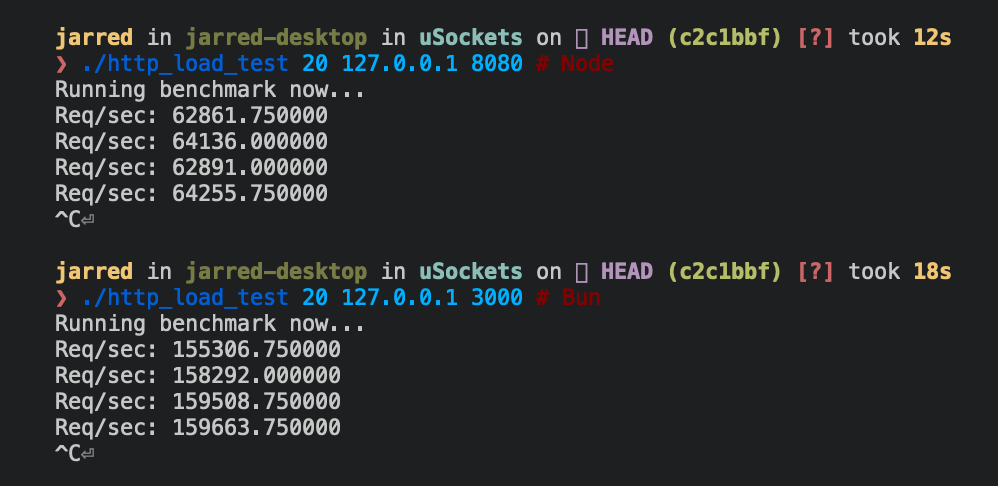
以下是 Bun 和 Node.js 的 HTTP 服务器实现:对每个传入的 `Request` 都响应 `Bun!`。
```ts Bun theme={"theme":{"light":"github-light","dark":"dracula"}}
Bun.serve({
fetch(req: Request) {
return new Response("Bun!");
},
port: 3000,
});
```
```ts theme={"theme":{"light":"github-light","dark":"dracula"}}
require("http")
.createServer((req, res) => res.end("Bun!"))
.listen(8080);
```
在 Linux 上,Bun.serve 服务器每秒可处理请求数大约是 Node.js 的 2.5 倍。
| 运行环境 | 每秒请求数 |
| ------- | --------- |
| Node 16 | \~64,000 |
| Bun | \~160,000 |
***
## 实例示范:REST API
这是使用 Bun 路由的基本数据库驱动 REST API,无任何依赖:
```ts server.ts expandable icon="file-code" theme={"theme":{"light":"github-light","dark":"dracula"}}
import type { Post } from "./types.ts";
import { Database } from "bun:sqlite";
const db = new Database("posts.db");
db.exec(`
CREATE TABLE IF NOT EXISTS posts (
id TEXT PRIMARY KEY,
title TEXT NOT NULL,
content TEXT NOT NULL,
created_at TEXT NOT NULL
)
`);
Bun.serve({
routes: {
// 列出帖子
"/api/posts": {
GET: () => {
const posts = db.query("SELECT * FROM posts").all();
return Response.json(posts);
},
// 创建帖子
POST: async req => {
const post: Omit = await req.json();
const id = crypto.randomUUID();
db.query(
`INSERT INTO posts (id, title, content, created_at)
VALUES (?, ?, ?, ?)`,
).run(id, post.title, post.content, new Date().toISOString());
return Response.json({ id, ...post }, { status: 201 });
},
},
// 根据 ID 获取帖子
"/api/posts/:id": req => {
const post = db.query("SELECT * FROM posts WHERE id = ?").get(req.params.id);
if (!post) {
return new Response("未找到", { status: 404 });
}
return Response.json(post);
},
},
error(error) {
console.error(error);
return new Response("内部服务器错误", { status: 500 });
},
});
```
```ts types.ts icon="https://mintcdn.com/bun-zhcndoc/cnUTwgMuf4cCrwC-/icons/typescript.svg?fit=max&auto=format&n=cnUTwgMuf4cCrwC-&q=85&s=e7767043c9e885c34f2d6c8fe2a95217" theme={"theme":{"light":"github-light","dark":"dracula"}}
export interface Post {
id: string;
title: string;
content: string;
created_at: string;
}
```
***
## 参考
```ts expandable See TypeScript Definitions theme={"theme":{"light":"github-light","dark":"dracula"}}
interface Server extends Disposable {
/**
* Stop the server from accepting new connections.
* @param closeActiveConnections If true, immediately terminate all connections
* @returns Promise resolved when the server stops
*/
stop(closeActiveConnections?: boolean): Promise;
/**
* Reload handlers without restarting the server.
* Only fetch and error handlers can be updated.
*/
reload(options: Serve): void;
/**
* Make a request to the running server.
* Used for testing or internal routing.
*/
fetch(request: Request | string): Response | Promise;
/**
* Upgrade an HTTP request to a WebSocket connection.
* @returns true if the upgrade succeeds, false otherwise
*/
upgrade(
request: Request,
options?: {
headers?: Bun.HeadersInit;
data?: T;
},
): boolean;
/**
* Publish a message to all WebSocket clients subscribed to a topic.
* @returns Number of bytes sent, 0 if dropped, -1 if backpressure is applied
*/
publish(
topic: string,
data: string | ArrayBufferView | ArrayBuffer | SharedArrayBuffer,
compress?: boolean,
): ServerWebSocketSendStatus;
/**
* Get the number of WebSocket clients subscribed to a topic.
*/
subscriberCount(topic: string): number;
/**
* Get the client IP address and port.
* @returns null for closed requests or Unix sockets
*/
requestIP(request: Request): SocketAddress | null;
/**
* Set a custom idle timeout for a request.
* @param seconds Timeout in seconds, 0 to disable
*/
timeout(request: Request, seconds: number): void;
/**
* Keep the process alive while the server is running.
*/
ref(): void;
/**
* Allow the server to be the only running runtime process to exit.
*/
unref(): void;
/** Current number of HTTP requests being processed */
readonly pendingRequests: number;
/** Current number of active WebSocket connections */
readonly pendingWebSockets: number;
/** Full server URL, including protocol, hostname, and port */
readonly url: URL;
/** Port the server is listening on */
readonly port: number;
/** Hostname the server is bound to */
readonly hostname: string;
/** Whether the server is in development mode */
readonly development: boolean;
/** Server instance ID */
readonly id: string;
}
interface WebSocketHandler {
/** Maximum WebSocket message size, in bytes */
maxPayloadLength?: number;
/** Number of bytes to queue messages before applying backpressure */
backpressureLimit?: number;
/** Whether to close the connection when the backpressure limit is reached */
closeOnBackpressureLimit?: boolean;
/** Called when backpressure is relieved */
drain?(ws: ServerWebSocket): void | Promise;
/** Idle timeout, in seconds */
idleTimeout?: number;
/** Enable per-message deflate compression */
perMessageDeflate?:
| boolean
| {
compress?: WebSocketCompressor | boolean;
decompress?: WebSocketCompressor | boolean;
};
/** Send Ping frames to keep the connection alive */
sendPings?: boolean;
/** Whether the server will receive messages published to itself */
publishToSelf?: boolean;
/** Called when the connection opens */
open?(ws: ServerWebSocket): void | Promise;
/** Called when a message is received */
message(ws: ServerWebSocket, message: string | Buffer): void | Promise;
/** Called when the connection closes */
close?(ws: ServerWebSocket, code: number, reason: string): void | Promise;
/** Called when a Ping frame is received */
ping?(ws: ServerWebSocket, data: Buffer): void | Promise;
/** Called when a Pong frame is received */
pong?(ws: ServerWebSocket, data: Buffer): void | Promise;
}
interface TLSOptions {
/** Certificate authority chain */
ca?: string | Buffer | BunFile | Array;
/** Server certificate */
cert?: string | Buffer | BunFile | Array;
/** Path to the DH parameters file */
dhParamsFile?: string;
/** Private key */
key?: string | Buffer | BunFile | Array;
/** Reduce TLS memory usage */
lowMemoryMode?: boolean;
/** Private key passphrase */
passphrase?: string;
/** OpenSSL option flags */
secureOptions?: number;
/** SNI server name */
serverName?: string;
}
```