> ## Documentation Index
> Fetch the complete documentation index at: https://bun.zhcndoc.com/llms.txt
> Use this file to discover all available pages before exploring further.
# 错误处理
> 学习如何在 Bun 的开发服务器中处理错误
要启用开发模式,设置 `development: true`。
```ts title="server.ts" icon="https://mintcdn.com/bun-zhcndoc/cnUTwgMuf4cCrwC-/icons/typescript.svg?fit=max&auto=format&n=cnUTwgMuf4cCrwC-&q=85&s=e7767043c9e885c34f2d6c8fe2a95217" theme={"theme":{"light":"github-light","dark":"dracula"}}
Bun.serve({
development: true, // [!code ++]
fetch(req) {
throw new Error("woops!");
},
});
```
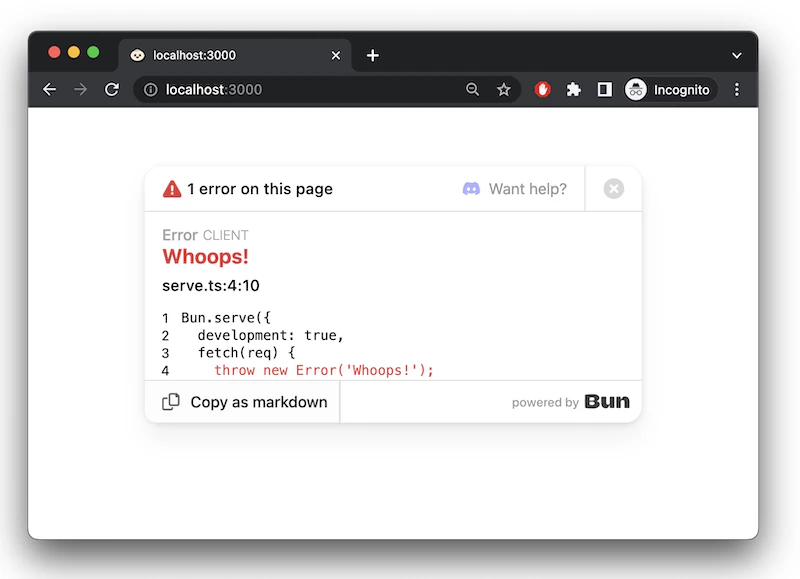
在开发模式下,Bun 会通过内置的错误页面在浏览器中显示错误。
 ### `error` 回调
要处理服务器端错误,请实现一个 `error` 处理函数。当发生错误时,该函数应返回一个 `Response` 供客户端使用。此响应会覆盖开发模式下 Bun 默认的错误页面。
```ts theme={"theme":{"light":"github-light","dark":"dracula"}}
Bun.serve({
fetch(req) {
throw new Error("woops!");
},
error(error) {
return new Response(`
### `error` 回调
要处理服务器端错误,请实现一个 `error` 处理函数。当发生错误时,该函数应返回一个 `Response` 供客户端使用。此响应会覆盖开发模式下 Bun 默认的错误页面。
```ts theme={"theme":{"light":"github-light","dark":"dracula"}}
Bun.serve({
fetch(req) {
throw new Error("woops!");
},
error(error) {
return new Response(`${error}\n${error.stack}`, {
headers: {
"Content-Type": "text/html",
},
});
},
});
```
[了解更多关于 Bun 调试的信息](/runtime/debugger)