> ## Documentation Index
> Fetch the complete documentation index at: https://bun.zhcndoc.com/llms.txt
> Use this file to discover all available pages before exploring further.
# 使用 Bun 连接 Upstash Redis
[Upstash](https://upstash.com/) 是一个完全托管的 Redis 数据库即服务。Upstash 兼容 Redis® API,这意味着你可以使用 Bun 的原生 Redis 客户端连接你的 Upstash 数据库。
所有 Upstash Redis 数据库默认启用 TLS。
***
通过运行 `bun init` 创建一个新项目:
```sh terminal icon="terminal" theme={"theme":{"light":"github-light","dark":"dracula"}}
bun init bun-upstash-redis
cd bun-upstash-redis
```
访问 [Upstash 控制台](https://console.upstash.com/) 并创建一个新的 Redis 数据库。完成[快速入门指南](https://upstash.com/docs/redis/overall/getstarted)后,你会看到数据库页面及其连接信息。
数据库页面显示两种连接方式;HTTP 和 TLS。对于 Bun 的 Redis 客户端,你需要使用 **TLS** 连接详情。该 URL 以 `rediss://` 开头。
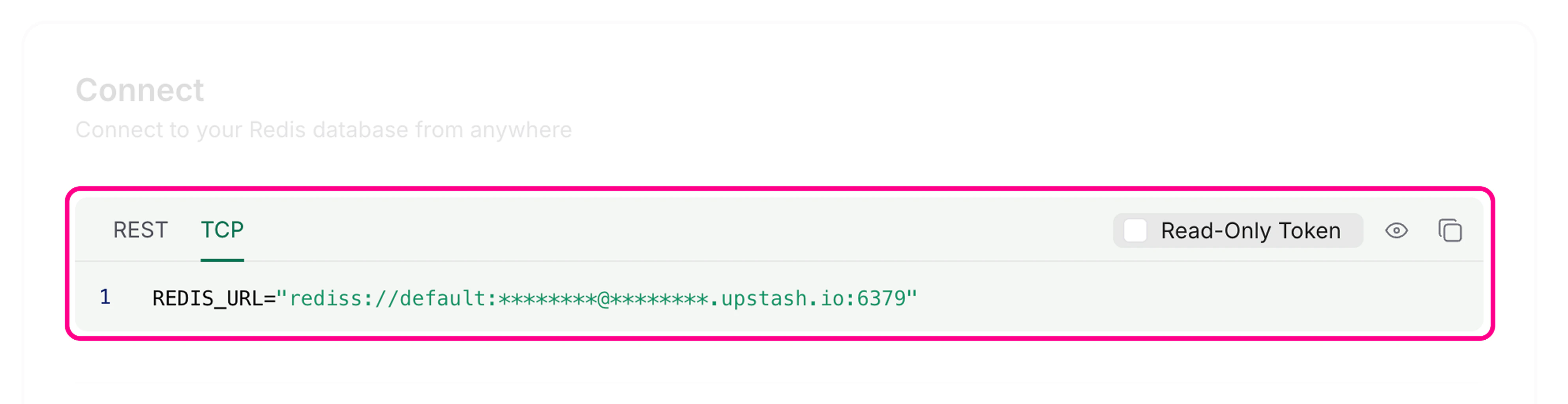 你可以通过设置环境变量,使用 Bun 默认的 `redis` 客户端连接 Upstash。
在你的 `.env` 文件中设置 `REDIS_URL` 环境变量,使用 Redis 端点(不是 REST URL):
```ini .env icon="settings" theme={"theme":{"light":"github-light","dark":"dracula"}}
REDIS_URL=rediss://********@********.upstash.io:6379
```
Bun 的 Redis 客户端默认从 `REDIS_URL` 读取连接信息:
```ts index.ts icon="https://mintcdn.com/bun-zhcndoc/cnUTwgMuf4cCrwC-/icons/typescript.svg?fit=max&auto=format&n=cnUTwgMuf4cCrwC-&q=85&s=e7767043c9e885c34f2d6c8fe2a95217" theme={"theme":{"light":"github-light","dark":"dracula"}}
import { redis } from "bun";
// 自动读取 process.env.REDIS_URL
await redis.set("counter", "0"); // [!code ++]
```
另外,你也可以通过 `RedisClient` 创建自定义客户端:
```ts index.ts icon="https://mintcdn.com/bun-zhcndoc/cnUTwgMuf4cCrwC-/icons/typescript.svg?fit=max&auto=format&n=cnUTwgMuf4cCrwC-&q=85&s=e7767043c9e885c34f2d6c8fe2a95217" theme={"theme":{"light":"github-light","dark":"dracula"}}
import { RedisClient } from "bun";
const redis = new RedisClient(process.env.REDIS_URL); // [!code ++]
```
现在你可以使用 Redis 客户端与 Upstash Redis 数据库交互:
```ts index.ts icon="https://mintcdn.com/bun-zhcndoc/cnUTwgMuf4cCrwC-/icons/typescript.svg?fit=max&auto=format&n=cnUTwgMuf4cCrwC-&q=85&s=e7767043c9e885c34f2d6c8fe2a95217" theme={"theme":{"light":"github-light","dark":"dracula"}}
import { redis } from "bun";
// 获取一个值
let counter = await redis.get("counter");
// 如果不存在则设置初始值
if (!counter) {
await redis.set("counter", "0");
}
// 递增计数器
await redis.incr("counter");
// 获取更新后的值
counter = await redis.get("counter");
console.log(counter);
```
```txt theme={"theme":{"light":"github-light","dark":"dracula"}}
1
```
Redis 客户端会自动在后台管理连接,无需手动连接或断开即可执行基本操作。
你可以通过设置环境变量,使用 Bun 默认的 `redis` 客户端连接 Upstash。
在你的 `.env` 文件中设置 `REDIS_URL` 环境变量,使用 Redis 端点(不是 REST URL):
```ini .env icon="settings" theme={"theme":{"light":"github-light","dark":"dracula"}}
REDIS_URL=rediss://********@********.upstash.io:6379
```
Bun 的 Redis 客户端默认从 `REDIS_URL` 读取连接信息:
```ts index.ts icon="https://mintcdn.com/bun-zhcndoc/cnUTwgMuf4cCrwC-/icons/typescript.svg?fit=max&auto=format&n=cnUTwgMuf4cCrwC-&q=85&s=e7767043c9e885c34f2d6c8fe2a95217" theme={"theme":{"light":"github-light","dark":"dracula"}}
import { redis } from "bun";
// 自动读取 process.env.REDIS_URL
await redis.set("counter", "0"); // [!code ++]
```
另外,你也可以通过 `RedisClient` 创建自定义客户端:
```ts index.ts icon="https://mintcdn.com/bun-zhcndoc/cnUTwgMuf4cCrwC-/icons/typescript.svg?fit=max&auto=format&n=cnUTwgMuf4cCrwC-&q=85&s=e7767043c9e885c34f2d6c8fe2a95217" theme={"theme":{"light":"github-light","dark":"dracula"}}
import { RedisClient } from "bun";
const redis = new RedisClient(process.env.REDIS_URL); // [!code ++]
```
现在你可以使用 Redis 客户端与 Upstash Redis 数据库交互:
```ts index.ts icon="https://mintcdn.com/bun-zhcndoc/cnUTwgMuf4cCrwC-/icons/typescript.svg?fit=max&auto=format&n=cnUTwgMuf4cCrwC-&q=85&s=e7767043c9e885c34f2d6c8fe2a95217" theme={"theme":{"light":"github-light","dark":"dracula"}}
import { redis } from "bun";
// 获取一个值
let counter = await redis.get("counter");
// 如果不存在则设置初始值
if (!counter) {
await redis.set("counter", "0");
}
// 递增计数器
await redis.incr("counter");
// 获取更新后的值
counter = await redis.get("counter");
console.log(counter);
```
```txt theme={"theme":{"light":"github-light","dark":"dracula"}}
1
```
Redis 客户端会自动在后台管理连接,无需手动连接或断开即可执行基本操作。